

When used properly, keyword match types can help you get tons of quality traffic to your website. In this blog post, we’ll share with you how Google Ads Keyword Match Types work and why it’s important to use them on your ad campaigns.
Keyword match types have changed a lot since 2022. In September 2021, Google rolled out expanded matching behavior that broadened how phrase and exact match interpret queries. Since then, AI-driven matching has taken over almost entirely. In May 2025, Google launched AI Max for Search (now generally available), which adds a “keywordless” matching layer on top of your keyword list. Broad match is now the default and Google’s most-recommended match type when paired with Smart Bidding. The job of the advertiser in 2026 is less about writing exhaustive keyword lists and more about feeding Google clean signals (conversion data, landing pages, negative keywords) so the algorithm picks the right queries for you.
Google Ads Keyword Match Types
Getting lots of clicks and impressions would be great but if it’s not generating any leads, you’re probably just wasting money on useless search queries. As someone who sells a specific product or service, you don’t want to show up to the wrong audience.
By choosing the best keyword match types for your ad, your ads show up in search terms that are relevant to your business. In this section, we’ll share with you how these three keyword match types differ from one another.
1. Broad Match Keywords
With the use of Broad Match Keywords, your ad will appear on relevant search queries and includes any term from your keyword. The search term doesn’t have to follow the exact order of your input, and it doesn’t even have to share any of the same words. Google uses AI to interpret intent based on your landing page content, your other keywords, search context, and your conversion history.
Here’s an example:
Let’s say you are selling croissant bread. However, not every individual who is interested in croissants wants to buy one. Some are just looking for recipes, nearby bakeries that sell croissants or are simply curious about their origin.
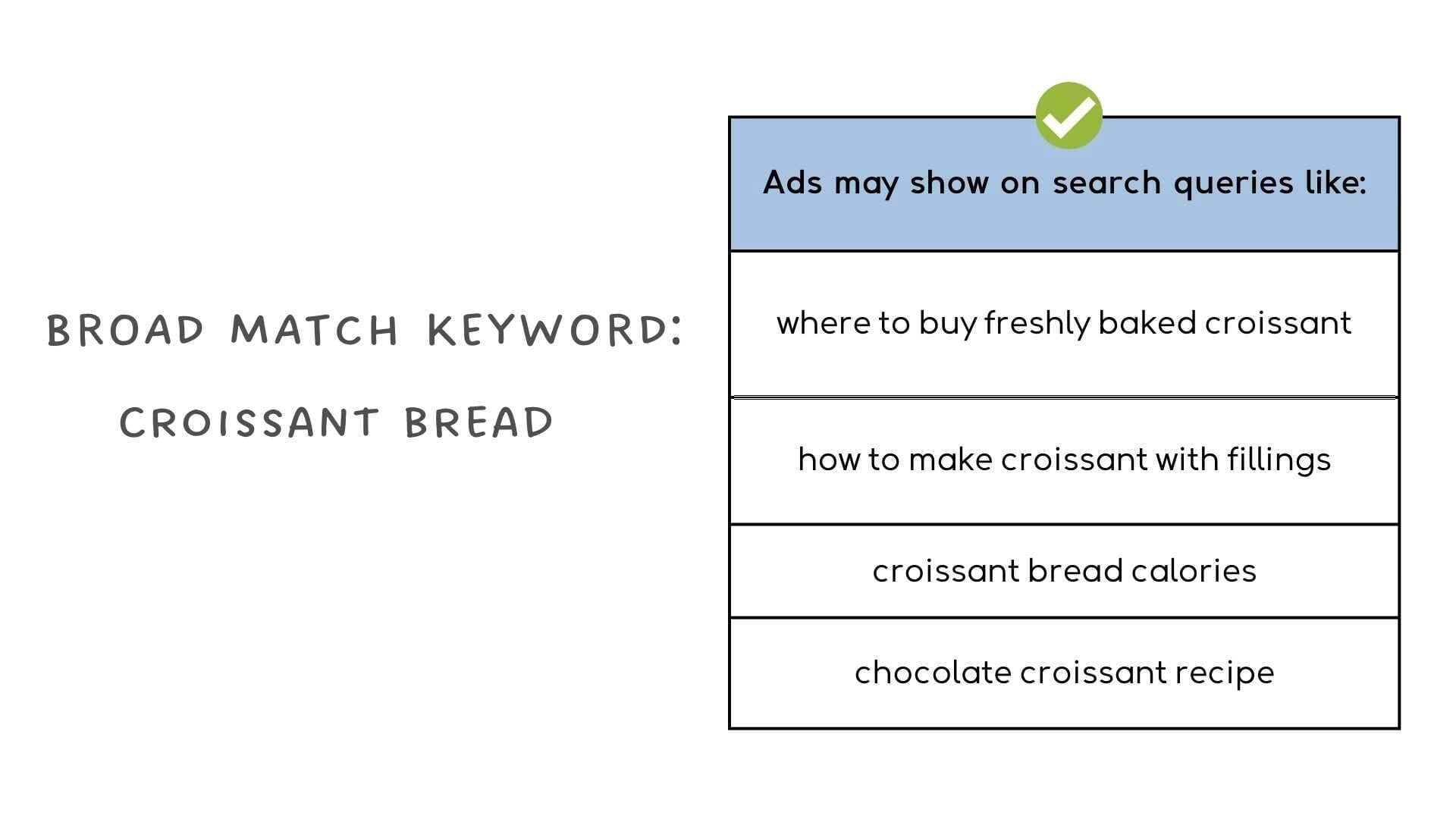
With the use of broad match keywords, you can get tons of traffic, allows you to reach a wide range of audiences as possible, and also lets you find more keywords that you otherwise would not have known. Broad match is also now the default match type in Google Ads.
Although it can help you get a huge volume of traffic, the impressions that you get, mostly come from people who aren’t really interested in your products or services. Not just that, you have no control over when your ads should show up which might consume your advertising budget in a short period of time.
Important rule for 2026: broad match should only be used with Smart Bidding (Maximize Conversions, Target CPA, or Target ROAS) and a healthy account with at least 30 to 50 conversions per month. Without Smart Bidding to steer it, broad match will burn your budget on irrelevant queries. You also need a strong negative keyword list built from day one. We treat broad match as a discovery tool: run it with conservative budgets, review your Search Terms report weekly, and promote winning queries to phrase or exact match in a separate campaign.
Remember broad match modifier?
It was retired back in 2021. If you still have BMM keywords in your account (the ones with + signs), they’re treated as phrase match keywords.
Heads up on one more change coming: starting September 2026, Google will begin automatically upgrading campaigns that use the campaign-level broad match setting to AI Max for Search. AI Max takes broad match a step further by removing keywords from the equation entirely and letting Google decide matching based on your landing pages, ads, and account context. It’s optional for now, and most advertisers we work with are sticking with broad match plus Smart Bidding because it keeps the keyword list as an anchor and the Search Terms Report readable.
2. Phrase Match Keywords
Phrase Match Keywords give you more control over when your ads will show up compared to broad match keywords.
Here, your ads will have a chance to appear on search terms that include your chosen keywords, close variations of them, and also on search queries that have the same meaning or intent as your phrase match. It may include additional words before and after your keyword, misspellings, synonyms, singular, and even plural versions.
Since the 2021 update, phrase match has absorbed most of what the old broad match modifier used to do. The word order only matters if it changes the meaning of the search. For example, the phrase match keyword “moving services NYC to LA” won’t match “moving services LA to NYC” because the direction of the move changes the meaning, but it will match longer queries that wrap your phrase in additional words.
How to use it?
Simply add quotation marks around your chosen phrase match keyword (e.g. “best croissants NYC”)
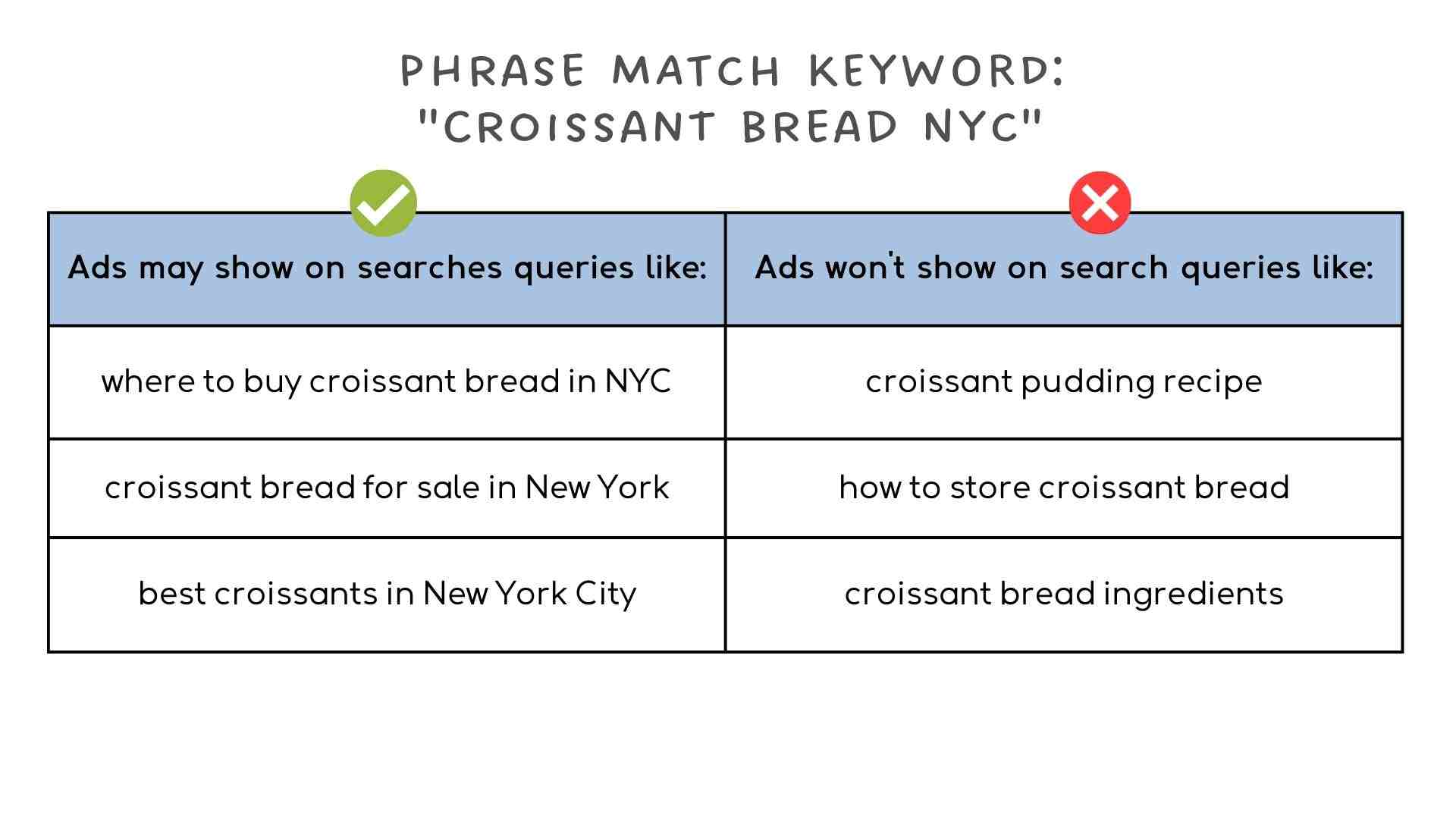
What’s great about phrase match keywords is that it brings focused traffic and prevents your ad from showing up on irrelevant search terms which your ads are prone to get if you’re using broad match keyword.
However, since you only want to receive traffic from individuals who are more likely to engage themselves with the products or services your brand provides, expect to get limited impressions and lower search traffic compared to what you’re getting from broad match. Phrase match is a solid middle ground for accounts that need more discipline than broad match offers but want more reach than exact match.
3. Exact Match Keywords
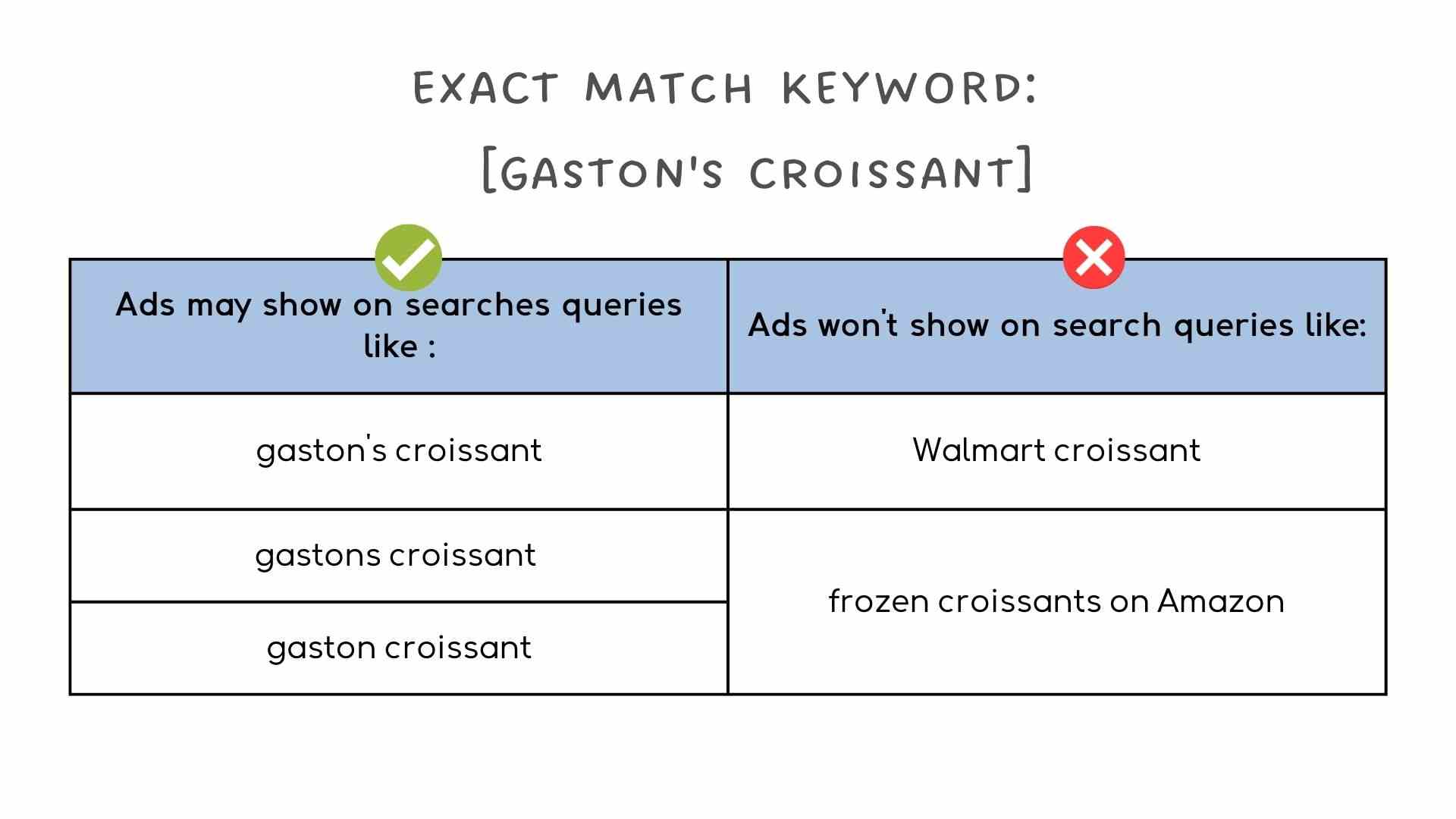
In Exact Match Keywords, your ad will show up only if the search query uses the same words as your exact match, and contains very close variations (i.e. misspellings, synonyms, punctuation marks) of your keyword. This match type gives you the most control over who can see your ad because you’re most likely to get traffic from individuals that have high intent toward the product or services you are offering. Not only that, but it also helps you reduce spending money on irrelevant search terms.
A small but important note for 2026: exact match isn’t truly “exact” anymore. It now matches same-intent searches, including reordered words and synonyms, as long as Google’s AI thinks the meaning is identical. For example, [running shoes] will match “shoes for running” and “running shoe.” Exact match is still the tightest match type, but expect some surprises in your Search Terms report.
Despite the close-variant expansion, exact match is still the best match type for protecting brand terms, your best converting keywords, and any campaign where keeping CPC predictable matters. It also has one important advantage in 2026: if a search query is identical to one of your exact match keywords, Google will prioritize your Search campaign over any Performance Max campaign in your account. That’s the only reliable way to keep PMax from “stealing” your best brand and intent traffic.
However, some of the downsides include having very low traffic, a very low impression rate, and the possibility to miss out on opportunities to rank for long-tail keywords.
To use exact match keywords, just put your chosen keyword within the brackets. For example, [Gaston’s croissant].
How the Three Match Types Work Together (2026 Tiered Strategy)
The smart play in 2026 is not to pick one match type, but to run all three in dedicated campaigns or ad groups with different roles:
- The Lab (Broad Match): a low-budget campaign with broad match keywords plus Smart Bidding. Its job is to discover what people are actually searching for. Review the Search Terms report weekly.
- The Factory (Phrase Match): take queries that convert from your broad match campaign and move them to phrase match with a bigger budget. This gives you scale without giving up control.
- The Vault (Exact Match): your best-performing queries, your brand terms, and your highest-margin products. Bid aggressively here and protect them from PMax.
This tiered structure keeps your spend efficient and gives Google’s AI enough room to work without letting it eat your budget on irrelevant queries.
Need help building your keyword list?
4. Negative Keywords
If you notice that your ads keep on showing up on search queries that are irrelevant to the products or services you are offering, there are chances that you might run out of advertising budget. To prevent that from happening, you should start building your negative keyword list.
Negative keywords prevent your ads from showing up on irrelevant search terms. Knowing how to use it is very useful because it helps you focus on receiving traffic that has a higher chance of giving you qualified leads.
Important difference to know: negative keyword match types behave differently from positive match types, and they have NOT changed with the AI-driven updates. Negative keywords do not match to close variants, synonyms, plurals, or misspellings the way regular keywords do. If you add “shoe” as a negative, it will not also block “shoes.” You have to be precise.
This is especially important in 2026 because positive keywords (especially broad match) now match very loosely. Your negative keyword list is the main lever you have for tightening that traffic. We recommend building negative lists aggressively from day one of any new campaign, and reviewing the Search Terms report at least weekly. Note that Google now hides roughly 20 to 40% of low-volume search queries for privacy reasons, so your visibility is partial. Watch what you can see and act on it quickly.
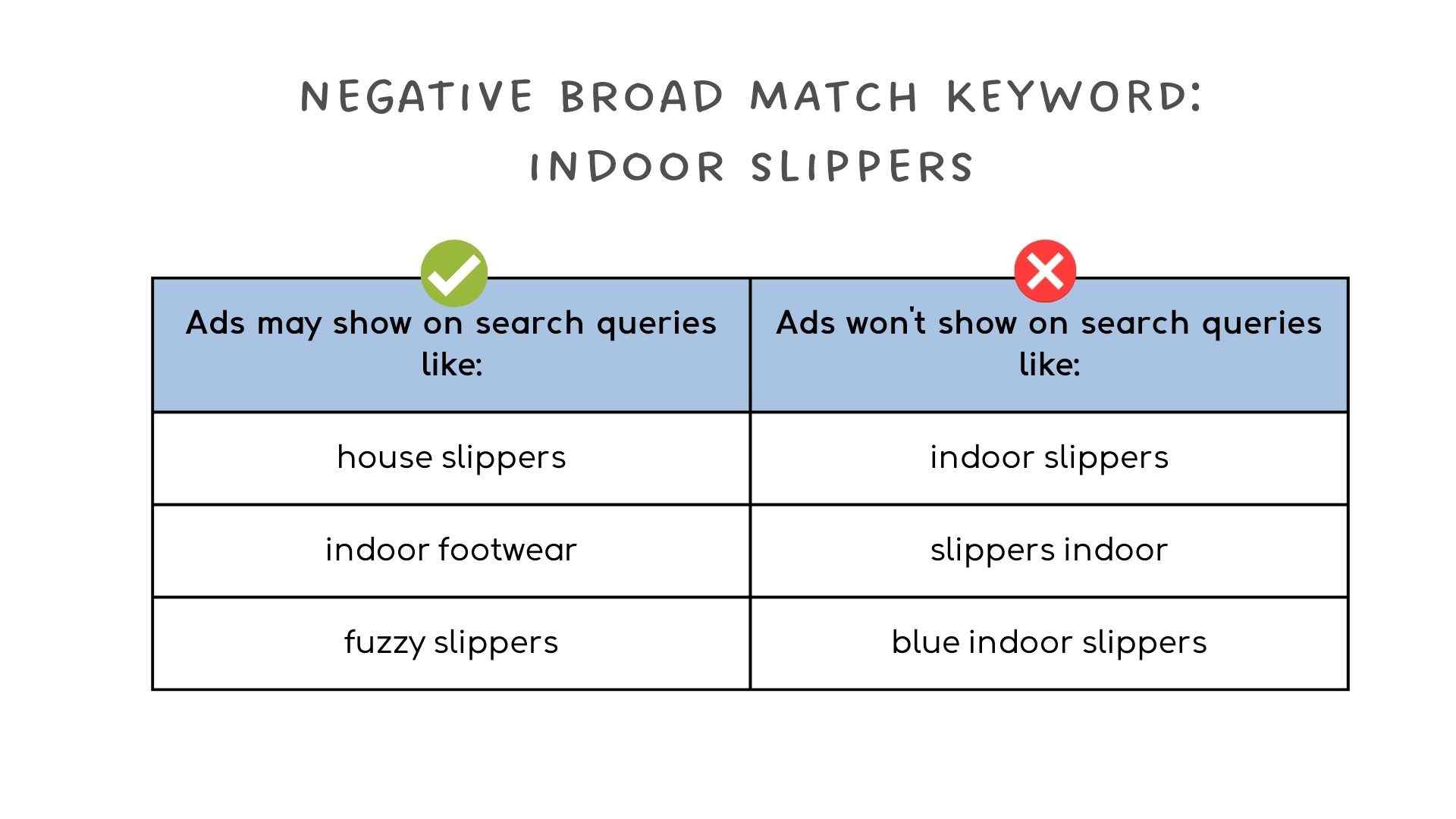
1. Negative Broad Match
The Negative Broad Match Keyword is the most restrictive match type because it prevents your ads from showing up no matter what the order of words used as long as it contains all of your negative keywords.
However, there are chances that your ad shows up if it contains some of the terms from your negative keyword.
Here’s an example:
2. Negative phrase match
In a Negative phrase match keyword, your ad won’t show up if they’re using the same sequence of words from your phrase match.
However, there are possibilities that your ad will show up if the search query has additional characters (e.g. singular and plural versions of your keyword) and contains very relevant terms.
To use it, just add quotation marks around your negative phrase to match keywords.
Example: “Indoor slippers”

Negative phrase match is our default for most exclusions. It’s strict enough to block the irrelevant query you saw, flexible enough to catch the same phrase wrapped in extra words, and avoids the over-blocking that negative broad match can cause.
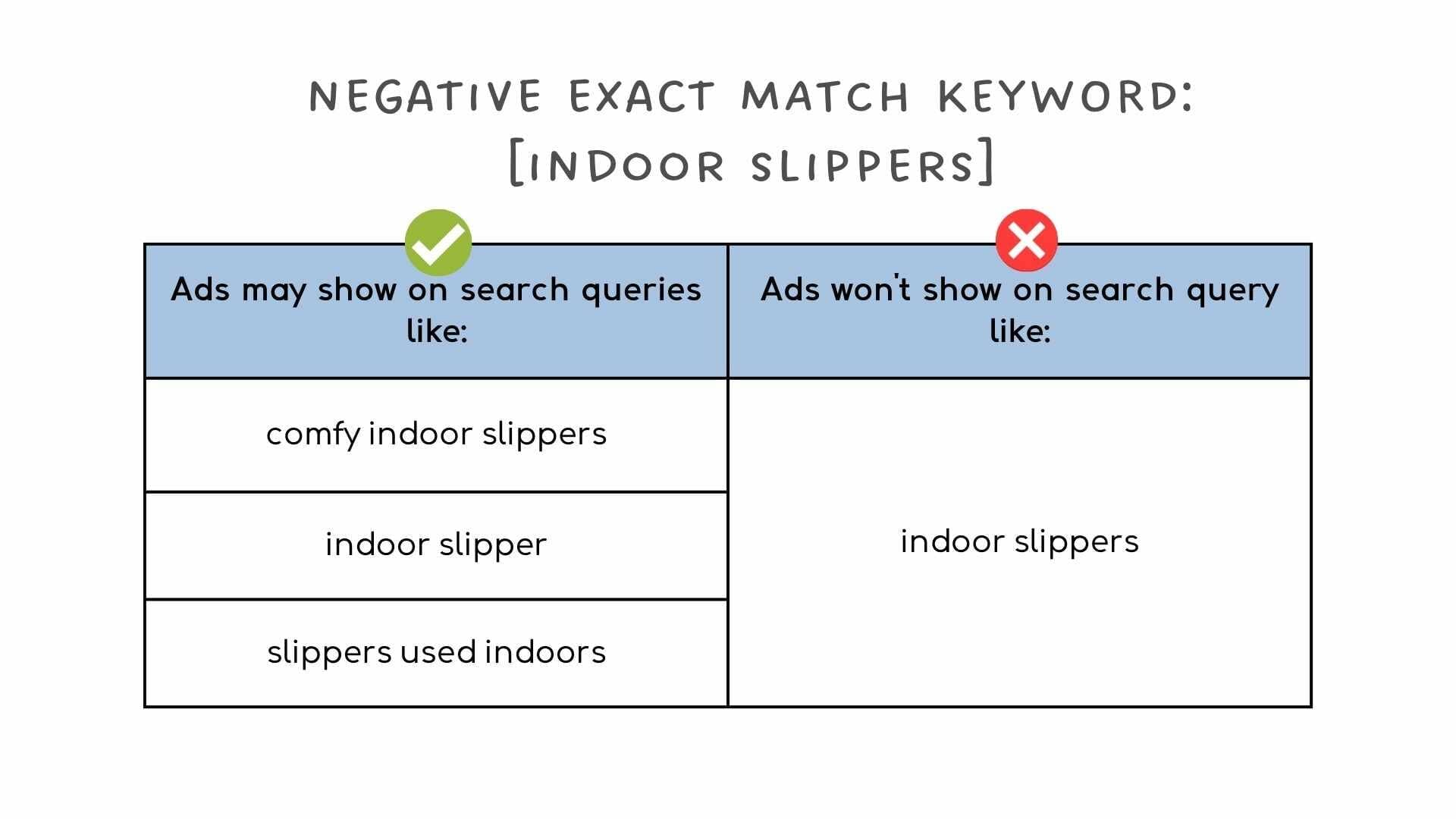
3. Negative exact match
In Negative exact match keywords, your ad won’t appear if it contains exact terms and follows the same sequence of words.
But, if the search query has additional keywords and contains some of the terms from your keywords, there are chances that your ad will still show up. To use a negative exact match, simply add brackets around your chosen keyword.
Example: [indoor slippers]
One trap to watch: when you add a negative keyword from the Search Terms report, Google defaults to exact match. This blocks the fewest searches (which keeps your spend higher for Google). Always review the match type before saving, and consider switching to phrase match for most exclusions.
Want to know how you can use negative keywords to improve your marketing strategies? Check out our blog post on 3 Tips on How To Increase Conversions Using Negative Keywords.
Not sure about your negative keyword list?
Where to find your negative keywords
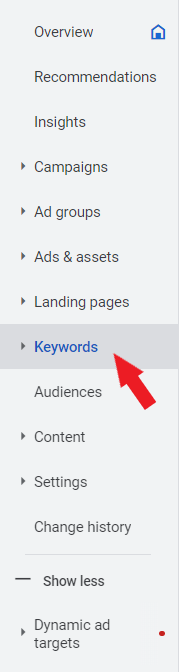
- From your Google Ads Account, go to “Keywords.”

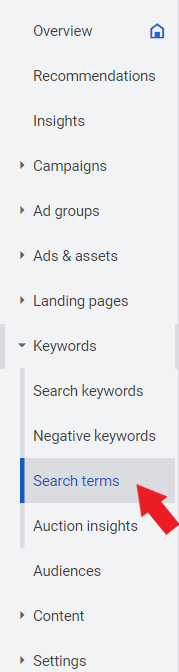
- Click “Search Terms.” You’ll see a list of the search queries that triggered your ad from showing up.
- From there, choose the ones that are irrelevant to the products or services you are offering by checking the box beside the search term,
- Once you’re done, you can add it to your ad groups, and ad campaigns, create a new list for it, or add it to your existing negative keyword list.
Don’t have enough time to create a negative keyword list?
How to add negative keywords using your Google Ads account
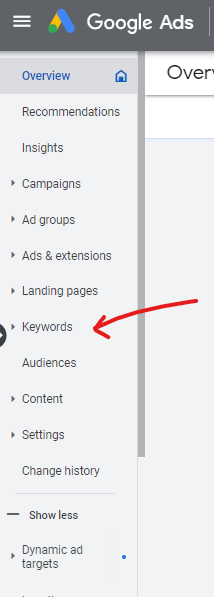
- On the left panel of your Google Ads account, click “Keywords“

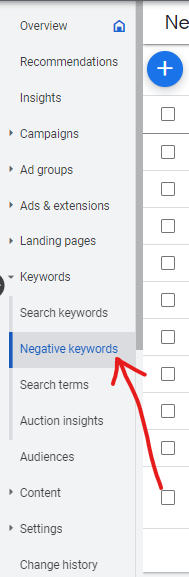
- Select “Negative Keywords“

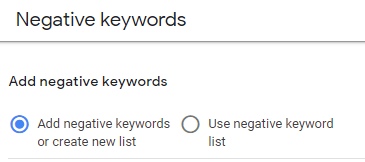
- Then, click “add negative keywords or create a new list”

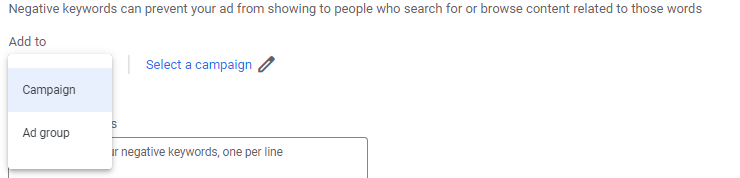
- Choose whether you’re going to add your negative keywords in the whole campaign or in specific ad groups.

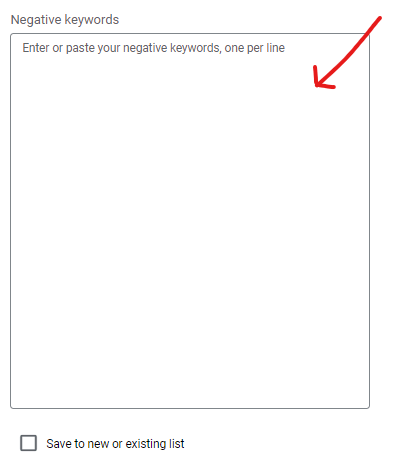
- Enter all of your negative keywords or paste them from the list you’ve created. Add one keyword per line.

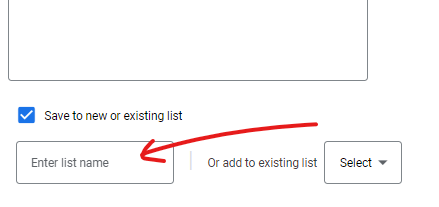
- Check the box that says “Save to new or existing list” and enter the name for your negative keyword list.

- Click “Save.”
Summary
Learning how keyword match types work can be tricky, especially when Google keeps changing how they behave. But it’s very important to understand how they work, especially if you want to reach a specific audience and not waste budget. In 2026, the key things to remember are: broad match is now the default and works best with Smart Bidding, phrase match is broader than it used to be, exact match isn’t truly “exact” anymore but still gives you the tightest control, and your negative keyword list is now your most important lever for controlling traffic quality. When creating a negative keyword list, you have to be extra careful (negatives don’t match close variants the way positives do) and use it at your own risk so that it won’t accidentally block valuable searches.


