

Essentially: AI Max is an AI optimization layer Google added to Search campaigns. It is not a new campaign type, so you don’t rebuild anything to use it. You just toggle it on inside your existing Search campaign and it broadens your matching, generates new ad copy, and can swap your landing page based on the query. It’s like PMAX but for your Search campaigns.
Google reports a typical 14 percent lift in conversions or conversion value at similar CPA or ROAS, jumping to roughly 27 percent for accounts still leaning hard on exact and phrase match.
But does what Google say match what we see for our clients? Our short answer for most clients we manage: yes, turn it on, but layer the controls (brand settings, URL exclusions, text guidelines) before you do, because the lever has more downside without them.
Some clients heard about it at Google Marketing Live, some saw a banner in their account telling them their Dynamic Search Ads or automatically created assets will be upgraded automatically in September. They want to know whether it actually works, what it changes, and whether they should flip the switch before Google does it for them. Below is how we think about it in the accounts we run at YoYoFuMedia, with the source data linked inline.
What Is AI Max for Search Campaigns?
AI Max for Search campaigns is a suite of AI-powered features Google built into Search campaigns to expand reach and tailor creative in real time.
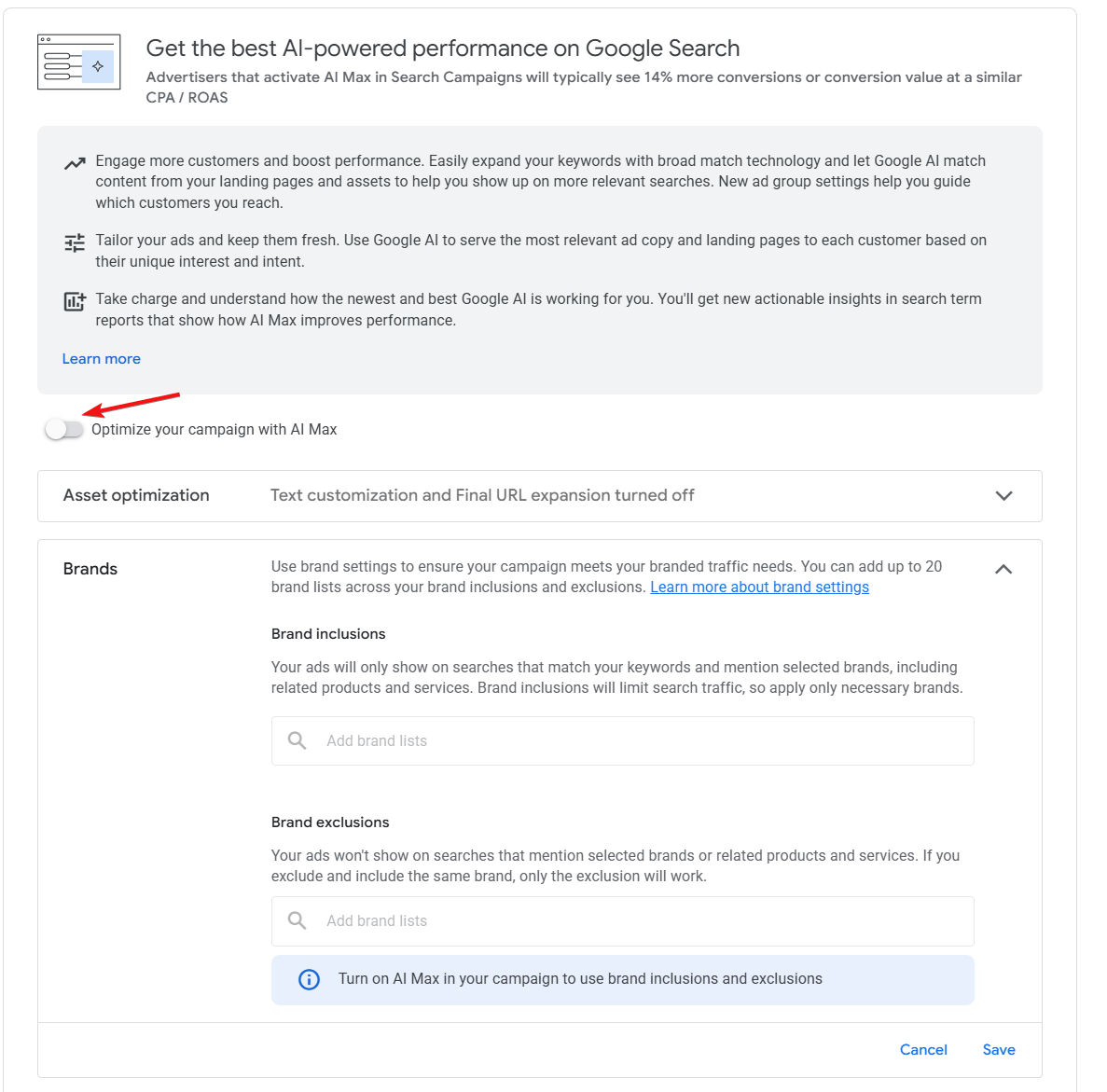
It is not a separate campaign type. You enable it inside an existing Search campaign with a single toggle, which is part of why uptake has moved quickly. Google described AI Max at launch as a “one-click feature suite” meant to be turned on without rebuilding anything. AI Max brings broader matching, automated creative generation, and dynamic landing pages into the same place, while keeping the controls that Search advertisers actually use, like keywords, negatives, and ad groups.
The cleanest way we describe it to clients is this: a standard Search campaign matches the keywords you bid on, serves the ads you wrote, and lands the click on the URL you specified. AI Max keeps all of that, then layers in extra matching, extra ad copy, and the option to swap your landing page when the system thinks a different page on your domain will convert better. Everything legacy still works underneath. The layer just gives Google’s ai more room to test and tweak what it serves when people searches.
How AI Max Differs From Standard Search Campaigns and Performance Max
Where AI Max sits on the spectrum is closer to Search than to Performance Max.
Performance Max takes nearly all targeting and creative decisions away from you and runs across YouTube, Display, Discover, Gmail, Maps, and Search. AI Max stays inside the Search auction. You keep keyword-level data in the search terms report, you keep ad-group structure, and you keep your bidding strategy. The AI is doing query expansion and creative generation, not channel routing. The other difference is control. Performance Max is famously light on what you can control, basically you get the control of your regular Search campaigns, but the AI advantages of a PMAX.
If you are running PMAX campaigns especially for your local business or healthcare practices, and you seen success with it, it’s a good idea to test out AI Max for your search campaigns. We have it running on our dentist and psychiatrist clinics and seen great results so far in our initial tests on clients where PMAX has worked well for them.
Not sure if AI Max is the right move for your account? We’ll walk you through it.
The Three Core Features Inside AI Max
Search Term Matching
Search term matching uses broad match technology plus what Google calls “keywordless” matching, which leans on your landing pages and assets to find queries you never added as keywords. The point is to capture intent your keyword list does not cover. The example Google uses is an apparel brand bidding on “red midi dress” and missing someone searching “colorful midi dresses for spring and summer,” even on broad match alone, because the semantic gap is wider than the keyword. With search term matching on, the system uses your URLs and creatives to recognize that intent and serve. Match priority between keywords and keywordless matches works the same way as the existing priority system Search and Performance Max already use.
Another example: for a dentist practice that’s bidding on “dental implants” keyword, it’ll miss out on someone searching “tooth that fell out a few years ago, what are my options,” even on broad match alone, because the semantic gap is wider than the keyword.
Basically, Google is looking at the person’s history of searches to see their intent level and putting your ads in front of it. So you’ll get shown for high intent people who might not be searching in the specific keyword you were bidding for.
Text Customization (Formerly Automatically Created Assets)
Text customization is the new name for what used to be called automatically created assets, or ACA. The system pulls from your existing ad copy, your landing page, and your keywords, then uses generative AI to write new headlines and descriptions tailored to specific searches. Google’s claim is that asset generation has improved at writing clear calls to action and pulling out unique selling points instead of bland filler. We have seen mixed results here depending on how strong the landing page is. If the page is thin or off-topic for the campaign, the generated assets reflect that. If the page reads cleanly with strong on-page copy, the new assets tend to be usable.
Final URL Expansion
Final URL expansion is the most aggressive of the three features. When it is on, Google can override the final URL you set on the ad and send the click to a different page on your domain if it predicts better performance. Google constrains the swap to URLs that are query-relevant and themed to your ad group, but the swap is the swap. You can rein this in with URL inclusions and exclusions. Worth noting: final URL expansion requires text customization to be on, because the AI needs latitude to rewrite the ad copy so it matches whichever page it picks. And if you use tracking templates with custom parameters, you have to confirm that your {lpurl} setup matches one of Google’s supported patterns or the dynamic landing pages can throw 404s.
What Google Reports for AI Max Performance
When AI Max launched in May 2025, the published lift was a typical 14 percent in conversions or conversion value at a similar CPA or ROAS for advertisers who turned it on. For accounts where more than 70 percent of conversions were still coming from exact or phrase match keywords, the uplift averaged 27 percent. The disclaimer on Google’s data is “non-Retail advertisers,” so retail and ecommerce numbers may behave differently.
A year in, Google added a second data point that is more relevant to the “should I turn on every feature” question. AI Max campaigns running the full feature suite (search term matching plus text customization plus final URL expansion) see an average of 7 percent more conversions or value at similar CPA or ROAS than campaigns running search term matching alone. In practice, that means the gain from layering text customization and final URL expansion on top of expanded matching is real but smaller than the gain from turning on the matching itself.
The case studies Google published are useful as ceilings, not averages. L’Oréal saw a 2x higher conversion rate at a 31 percent lower cost per conversion after activating AI Max. MyConnect, an Australian utility connection service, drove 16 percent more leads at a 13 percent lower CPA, with a 30 percent increase in conversions from net-new queries the original keyword list never touched. We have not seen 2x conversion rates in the small and mid-budget accounts we run, but we have seen meaningful lift on net-new queries in most accounts where we turned the feature on.
Want to know if your account is positioned to capture that 27 percent lift?
The Controls That Make AI Max Less Risky Than Performance Max
The reason we are comfortable recommending AI Max to clients is it has more control than PMAX. Brand settings let you tell Google which brands your ads can and cannot appear alongside. Brand inclusions work at both campaign and ad group level; brand exclusions are campaign level only. Locations of interest let you target users by where they are searching about, not just where they are physically, which is useful for service businesses that take inquiries from out of market. URL inclusions let you allow specific pages that final URL expansion did not catch, and URL exclusions block pages you do not want the AI sending paid traffic to, like blog posts that do not convert.
Text guidelines are the most flexible control of the set. They let you write plain-English instructions for the generative AI, like “never mention price” or “do not use the word affordable.” Text guidelines opened up to all advertisers globally in early 2026, and AI Brief, a Gemini-powered control surface with messaging, matching, and audience guidelines you can write in your own words, started rolling out a couple months later.
When We Turn AI Max On (and When We Hold Off)
Our default for established campaigns with reliable conversion tracking is to turn AI Max on, but with constraints layered first. We add URL exclusions for non-relevant/thin blog content and any low-intent pages, set text guidelines to keep generated copy on brand, and add brand exclusions if a competitor is bidding on us in a way that the AI might mirror. For accounts that have been running mostly exact and phrase match keywords, we turn it on faster, because the published 27 percent uplift in those accounts lines up with what we see in practice: most of the gain comes from matching that should have already been happening.
We hold off in a few specific cases. New campaigns without enough conversion data to train the bidding strategy do not give AI Max enough signal to work with, so we wait until we have at least a few weeks of conversion volume. Lead-gen accounts where lead quality varies wildly by query (and where the Calls and/or CRM is not feeding back to Google as offline conversions) are another place we slow down, because the system will optimize toward whatever is set as a conversion, and bad leads in means bad leads out. Regulated industries that require specific compliance language in every ad were a hold for a while, but text disclaimers for AI Max rolled out in 2026, which guarantee required text always appears even when final URL expansion is on. That has changed our answer for several legal and finance clients.
How to Set Up AI Max in Your Search Campaign
Setup happens inside a Search campaign, not on a new campaign creation flow. Open the campaign, go to the settings panel, and look for AI Max. Toggling the campaign-level switch on turns on search term matching, text customization, and final URL expansion together. Each one is independently switchable from there, so if you want the matching but not the URL swap, you can run that configuration. Before flipping the switch, we recommend doing four things: confirm your tracking template uses a supported {lpurl} pattern so final URL expansion does not break landing pages, add URL exclusions for any pages you do not want the AI sending paid traffic to, set brand inclusions and exclusions, and write text guidelines for tone, banned words, and required claims.
Google’s one-click experiments are useful here. They let you run an A/B test with AI Max on against a control without AI Max, and the experiment dashboard gives you a clean read on whether the lift is real in your account. We use experiments on accounts where the client wants to see the lift quantified before committing the whole campaign, especially mid-budget accounts where a 14 percent move is meaningful but not eye-popping. For accounts that want richer post-launch reporting on what the AI is actually matching to, our PPC data segmentation guide covers how to pull the AI Max match-type column out of the search terms report.
The September 2026 Auto-Upgrade: DSA, ACA, and Campaign-Level Broad Match
Starting September 2026, three legacy features auto-upgrade into AI Max: Dynamic Search Ads (DSA), automatically created assets (ACA), and the campaign-level broad match setting. After that point, you will not be able to create new campaigns with DSA in the UI, Editor, or API. Existing campaigns with these settings will be migrated to AI Max with settings configured to mirror the legacy setup. DSA campaigns get all three AI Max features turned on. ACA campaigns get search term matching plus text customization. Campaign-level broad match users get search term matching by default.
Google’s recommendation is to upgrade voluntarily before September so you have time to learn the new controls before they are forced on you, and that is also our recommendation for accounts running any of those three legacy features. The upgrade tool ports your historical settings and data over, so you do not lose the structure you built. The cleaner story is that DSA was already doing most of what AI Max does, just with worse creative generation and less control, so the transition for DSA-heavy accounts is mostly an upside swap. If you want our full take on running Google Ads in the AI Max era, or if you want us to handle the migration in your account, our Google Ads management team works on accounts like this every week.
My Personal Speculation On Where Things Are Headed
If you have used Google’s Gemini lately, you’ll see that “Gemini Apps Activity” is on which shares your Gemini Google activity with Google. I would not be surprised if they are using people’s activity in their AI targeting. Once again, this is just my personal speculation on where things are headed.
The signs are there. It’s why Google hasn’t been rushing to put ads into Gemini just yet and are willing to lose money on it. Google doesn’t need to put ads in Gemini to increase their revenue, all they need to do, to monetize is to use that activity to serve more targeted ads on their other channels.
This is why they can show relevant ads and “keywordless” matching is so effective. A potential customer might have searched it on Gemini but not on Google. With keywordless matching from AI Max, Google would be able to know intent and show your ad even on a keyword that might not normally make sense.
Read between the lines here on Google’s CEO Sundar Pichai on their shareholder report:
“Our AI investments and full stack approach are lighting up every part of the business. Search had a strong quarter with AI experiences driving usage, queries at an all time high, and 19% revenue growth.”
Here is another quote from Philipp Schindler Chief Business Officer on Google’s earnings call:
“First, ads quality. AI is boosting our ability to deeply understand user intent for a given search query and to find the most relevant ad. Even when we don’t have a direct user query, we’re making significant strides in improving relevance. We’re pairing the strength and prediction-driven relevance with bottom of funnel precision”
“In Maps, we’re using Gemini to ensure promoted pins are deeply relevant to user surroundings, location of interest, history and intent. This work is improving ad’s relevance by nearly 10%, leading to a significant increase in user engagement.”
Google just had a strong increase in revenue and the “AI is would kill Search” narrative doesn’t look to be true anymore. Google Search & other grew 19%. Alphabet’s Q1 2026 ad revenues alone were up 15.5% at $77.3 billion.
Ready to get AI Max set up cleanly before the September auto-upgrade?
Frequently Asked Questions About AI Max for Search Campaigns
Is AI Max a new campaign type?
No. AI Max is a feature suite you toggle on inside an existing Search campaign. You do not rebuild anything, and your keywords, ad groups, and bidding strategy all stay where they are.
Does AI Max replace keywords?
No. Keywords still serve and still get the same priority they had before. AI Max adds broad match and keywordless matching on top to find queries your keyword list misses. You can keep adding negatives the way you always have.
How is AI Max different from Performance Max?
AI Max stays inside the Search auction and keeps your campaign structure intact. Performance Max routes spend across YouTube, Display, Discover, Gmail, Maps, and Search and gives you almost no creative or targeting control. AI Max has brand settings, locations of interest, URL inclusions and exclusions, and text guidelines that Performance Max does not.
Will AI Max increase my CPA?
It could, but we have seen it decrease CPA in our accounts that have clean conversion / call tracking and decent landing pages and blog posts. We seen from our audits that accounts that don’t properly qualify leads or mark leads at all, AI Max has gotten them more irrelevant leads. Just like you would expect on a PMAX campaign without proper conversion tracking. So make sure you have proper conversion tracking set up and are actually qualifying leads.
Can I turn off final URL expansion and keep the rest?
Yes. Each of the three core features (search term matching, text customization, and final URL expansion) is independently switchable inside the campaign. If you do not want Google rewriting your final URLs, you can keep that feature off and still get the matching and creative generation.
What happens to my Dynamic Search Ads in September?
Existing DSA campaigns will auto-upgrade to AI Max, with all three features turned on and settings configured to mirror your legacy DSA setup. New DSA campaign creation will be turned off across the UI, Editor, and API. Google recommends upgrading manually before September so you can familiarize yourself with the new controls.

