

Some months, the phones are ringing nonstop. Other months, you’re back to chasing brokers, load boards, or referrals just to keep trucks moving. Add in driver recruiting pressure and rising competition, and it starts to feel like you’re always reacting instead of growing.
The good news? The shippers and drivers you want are already searching on Google for services like yours!
This Google Ads for Trucking Companies step-by-step guide will show you how to run Google Ads to put your company in front of high-intent prospects, filter out low-quality leads, and build a steady pipeline.
If you’re ready to take more control over your inbound freight and recruiting, let’s break it down.
What is Google Ads?
Google Ads is a digital advertising platform that allows your trucking company to appear at the top of Google when someone searches for services you offer.
Years ago, it was simply about bidding on keywords. Today, Google’s system uses advanced machine learning to help you reach the right shippers and drivers based on their search behavior, location, and intent.
Instead of chasing freight, you position your company in front of the people already looking for you.
Google Ads for Trucking Companies Step-by-Step Guide
This guide walks you through launching your first campaign the right way. We will follow the exact structure needed to attract high-intent shippers and serious CDL (Commercial Driver’s License) drivers. Each step is designed to give you clarity, control, and better lead quality from day one.
Step 1: Create Your Google Ads Account
Go to ads.google.com.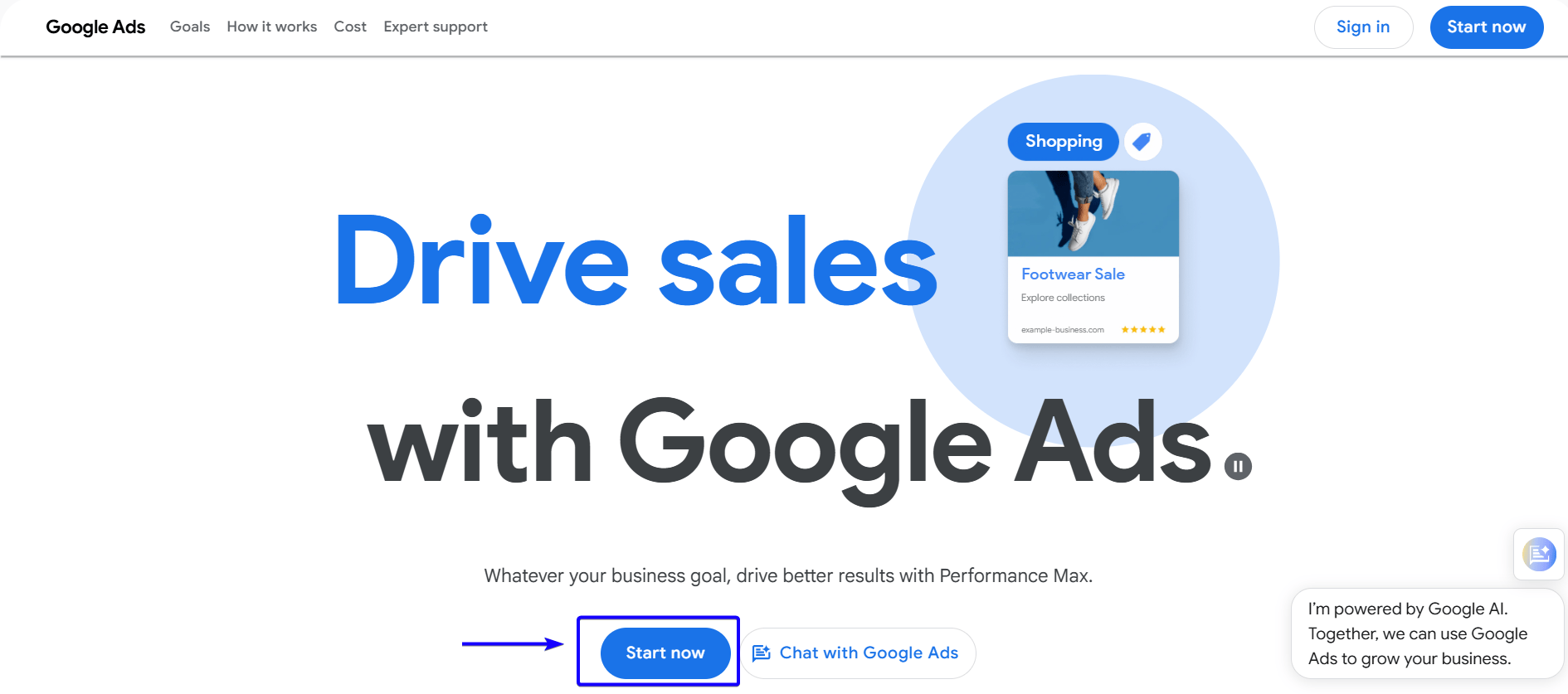
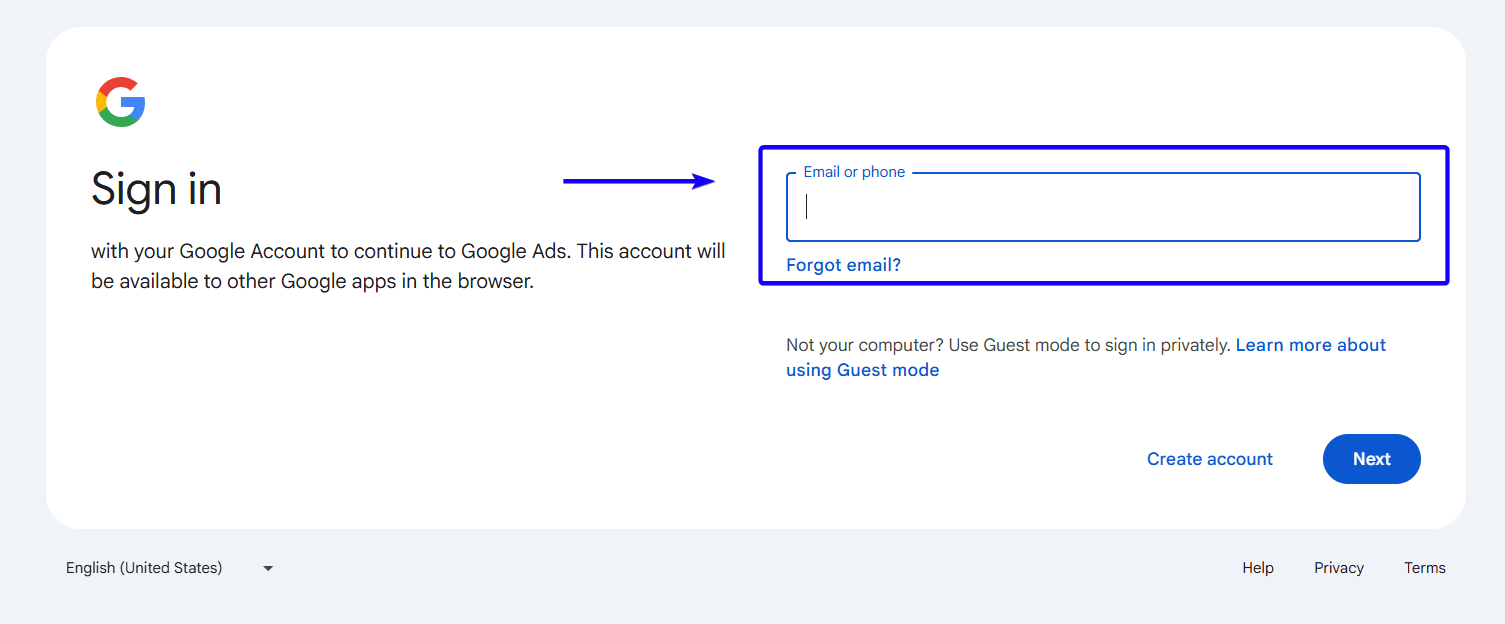
Sign in with your business Google account. This account will be the control center where you manage your campaigns, budgets, and performance tracking. Keep access limited to key decision-makers so your data stays organized and secure.
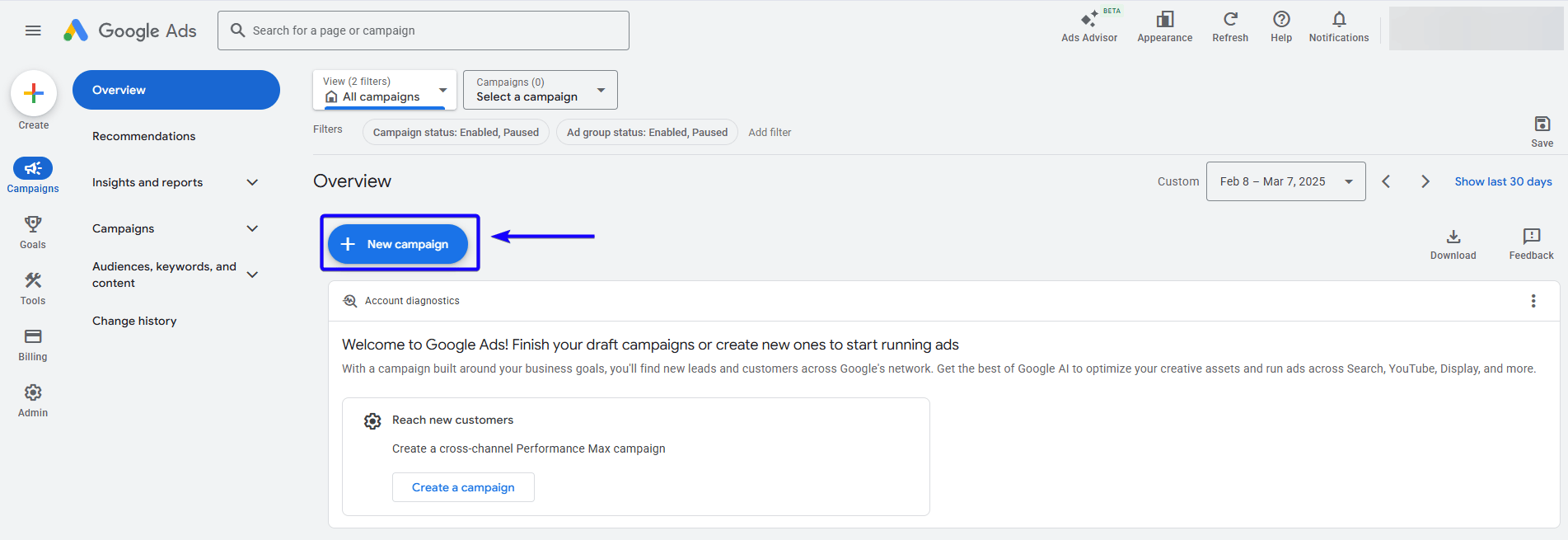
Once you’re in, head over to the overview page to start your campaign.
Step 2: Select Your Campaign Objective
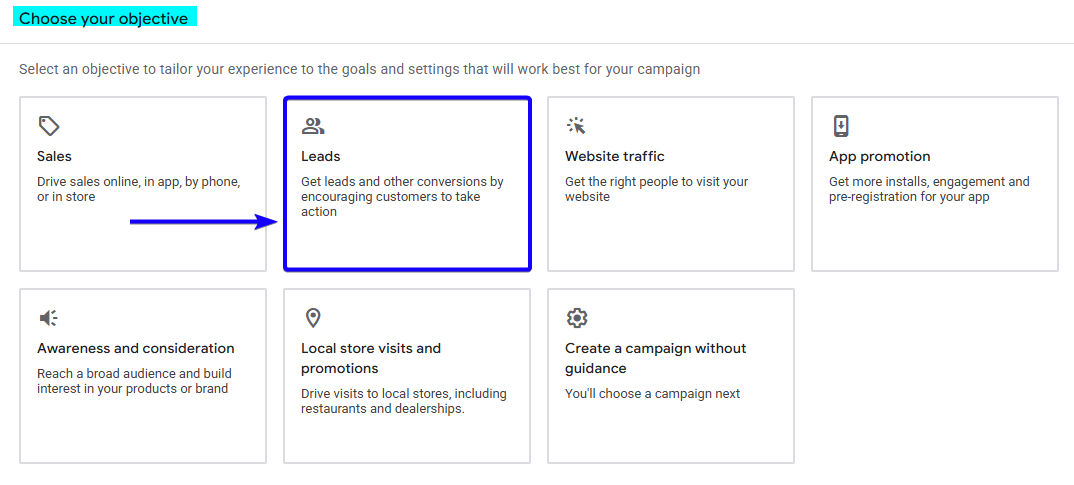
Leads as Campaign Objective
A campaign objective tells Google what action matters most to your business. The most important action is generating a freight quote request or a completed driver application. Selecting “Leads” instructs Google to optimize your campaign toward people most likely to submit a form or call your dispatch team.
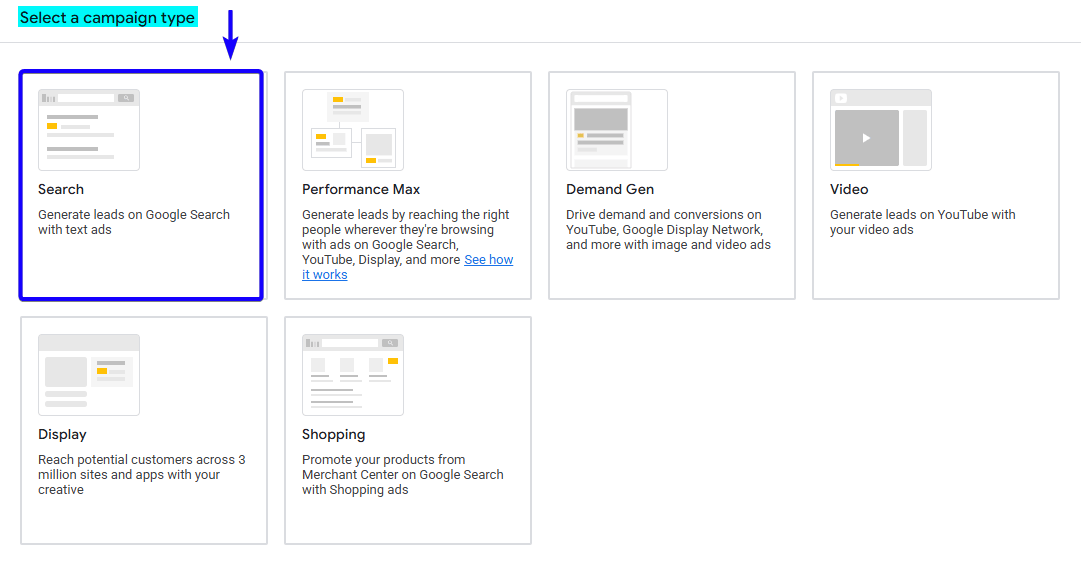
Step 3: Choose Your Campaign Type
Search as a Campaign Type
The campaign type determines where your ads will appear across Google’s platforms. Search campaigns place your ads directly inside Google’s search results when someone types in relevant keywords. This is the best starting point because it captures people at the exact moment they are looking for a carrier or a driving job.
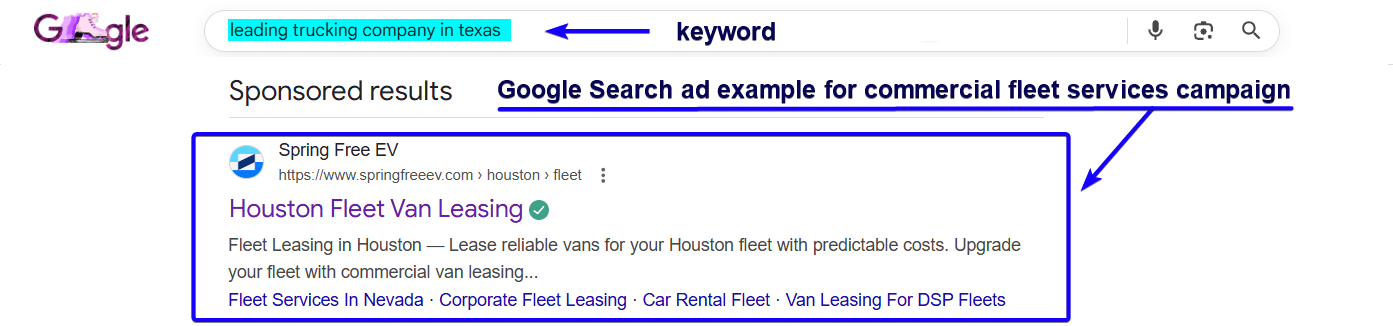
This is an example of a Google Search ad promoting commercial fleet services:
Turn Google Searches Into Booked Loads. Let our experts create a results-driven Google Ads system that brings serious shippers and CDL drivers straight to you.
Schedule Your Strategy Call Today
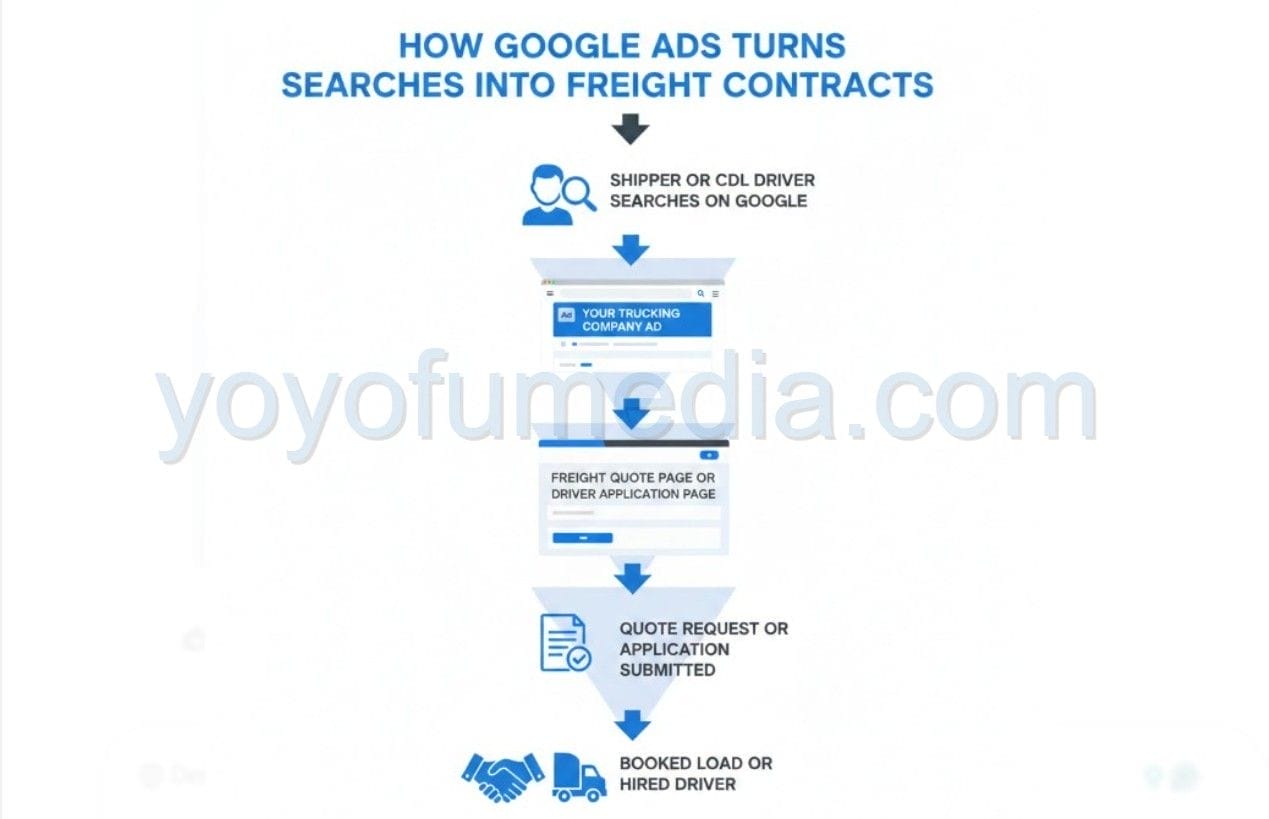
How Google Ads Turns Searches into Freight Contracts
This diagram shows how Google Ads creates a predictable flow of freight and driver opportunities. It starts when a shipper or CDL driver searches on Google, your ad appears at the top of the results, and they click through to a focused landing page. From there, they submit a freight quote request or job application, which your team follows up on, ultimately turning online searches into booked loads or hired drivers.
Step 4: Configure Your Campaign Settings
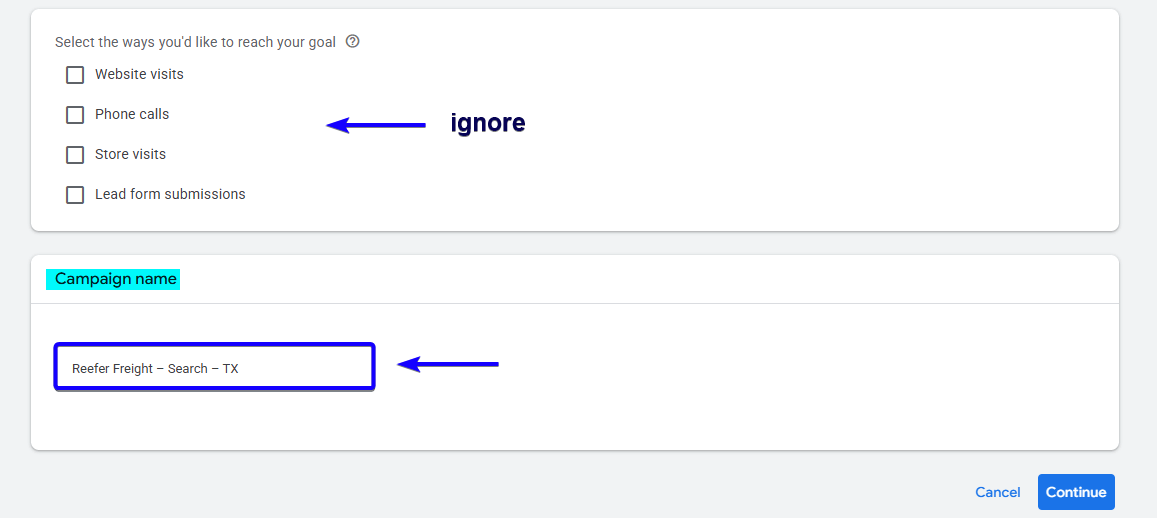
Campaign Name
A campaign name is simply an internal label that helps you quickly understand what the campaign is targeting. A clear naming structure keeps your reporting organized and makes scaling easier as you grow. You should include the service type, campaign type, and location.
You can use this format:
Service – Campaign Type – Location
Campaign Name Examples:
- Reefer Freight – Search – Texas
- Flatbed Transport – Search – Dallas
- Drayage Services – Search – Houston
- CDL Drivers – Search – Texas
Network Settings
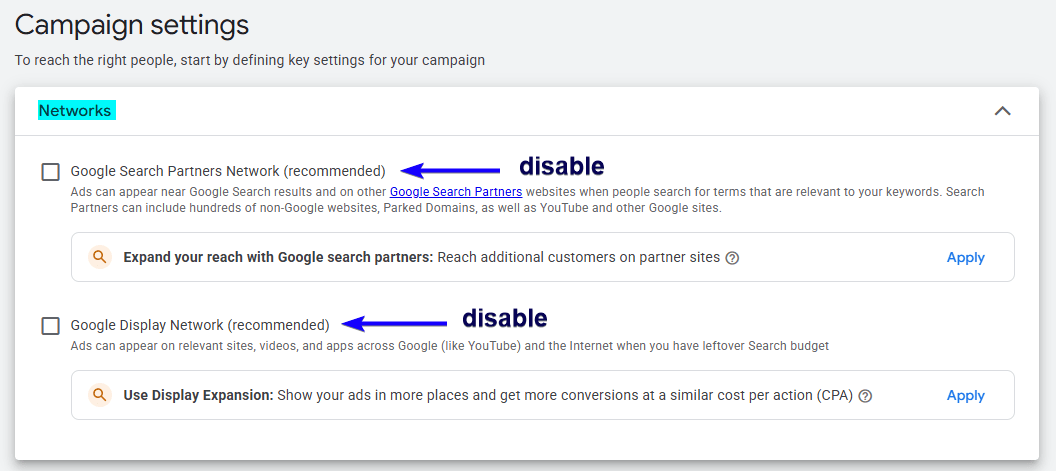
Network settings control where your ads are allowed to appear within Google. By default, Google may include additional networks like Search Partners or Display, which can dilute traffic quality. Disabling these ensures your budget is spent only on high-intent searches directly on Google.
Location Targeting
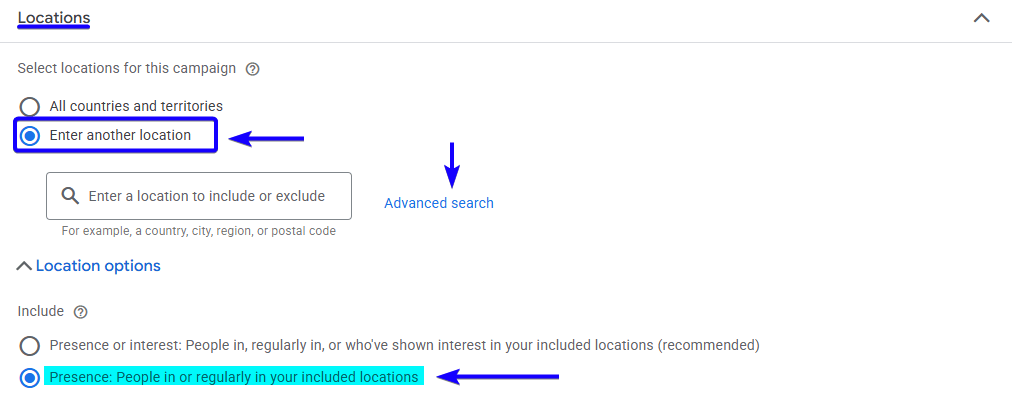
Location targeting tells Google where your ads should be shown geographically. Since targeting specific cities or freight corridors improves competitiveness and efficiency. Always select “Presence: People in or regularly in your included locations” to avoid out-of-state clicks.
Radius Targeting
Radius targeting allows you to draw a defined boundary around your terminal location, such as a 50-mile radius. This ensures your ads are only shown to users physically located within your service area. This prevents wasted spend and improves lead quality by focusing on the regions you actually dispatch from.

Languages
Language targeting determines the language settings of users who will see your ads. This ensures your ads appear only to people who can understand your message and communicate effectively with your team. Most Texas campaigns will target English, though Spanish can be added if relevant for driver recruitment.

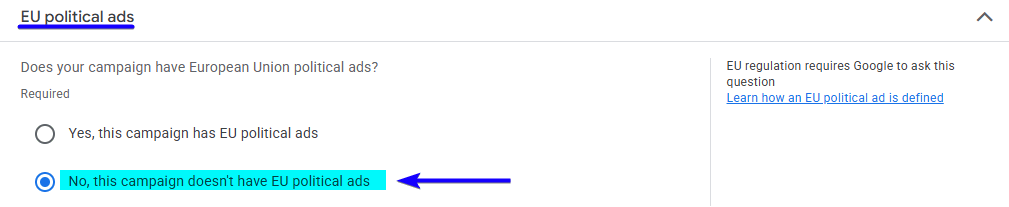
Disable EU Political Ads
Audience Segments
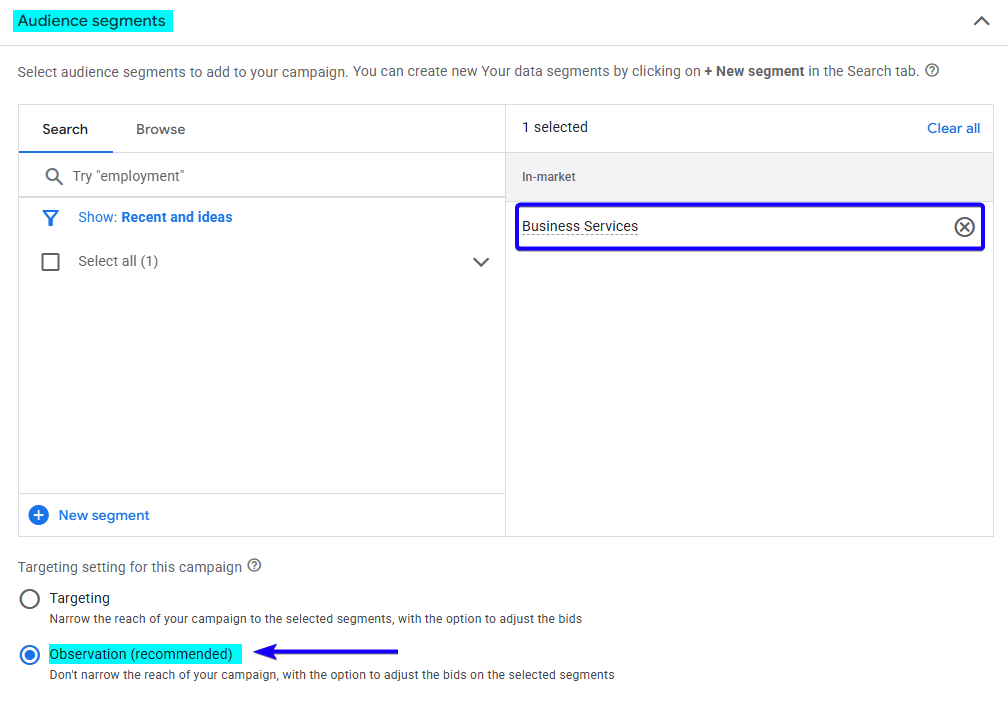
Audience segments are groups of users categorized by interests, behaviors, or purchase intent. While keywords capture active searches, audience segments add an additional data layer for smarter optimization. Use “Observation” mode so you can collect data without restricting your reach.
Recommended segments:
- Transportation & Logistics
- Business Services
- Employment Services (for CDL campaigns)
Campaign Schedule
Campaign scheduling controls the days and times your ads are active. This allows you to run ads when your sales or recruiting team can respond quickly to calls and form submissions. Faster response times often lead to higher close rates.

Ad Rotation
Ad rotation determines how Google distributes multiple ads within an ad group. Choosing “Do not optimize: Rotate ads indefinitely” allows each ad to gather fair performance data. This prevents Google from favoring one variation too early without sufficient information.

Step 5: Set Your Budget and Bidding Strategy
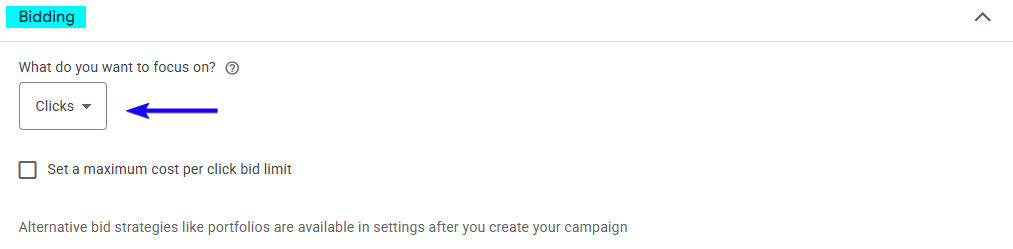
Bidding Strategy
A bidding strategy tells Google how to spend your budget to achieve your objective. Starting with “Clicks” allows you to gather initial traffic and keyword performance data. Once conversions are recorded consistently, you can shift to “Conversions” for better efficiency.
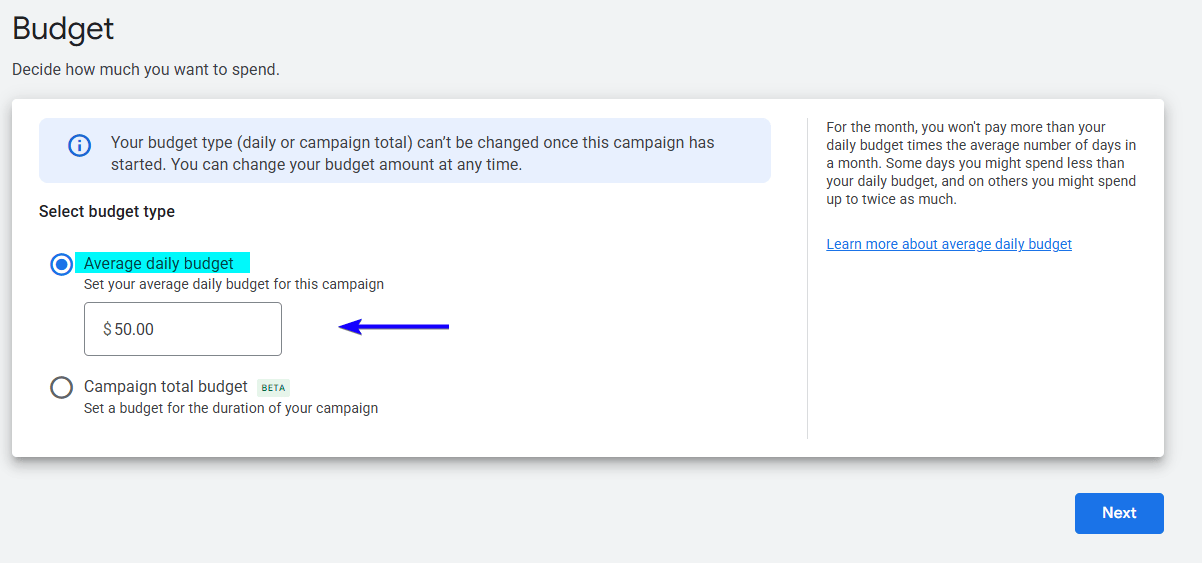
Budget
Your budget is the average daily amount you are willing to spend on advertising. Google may slightly exceed your daily limit on high-traffic days, but will balance it over the month. Start with a controlled budget and increase it once profitable results are proven.
Step 6: Create Your Ad Group and Keywords
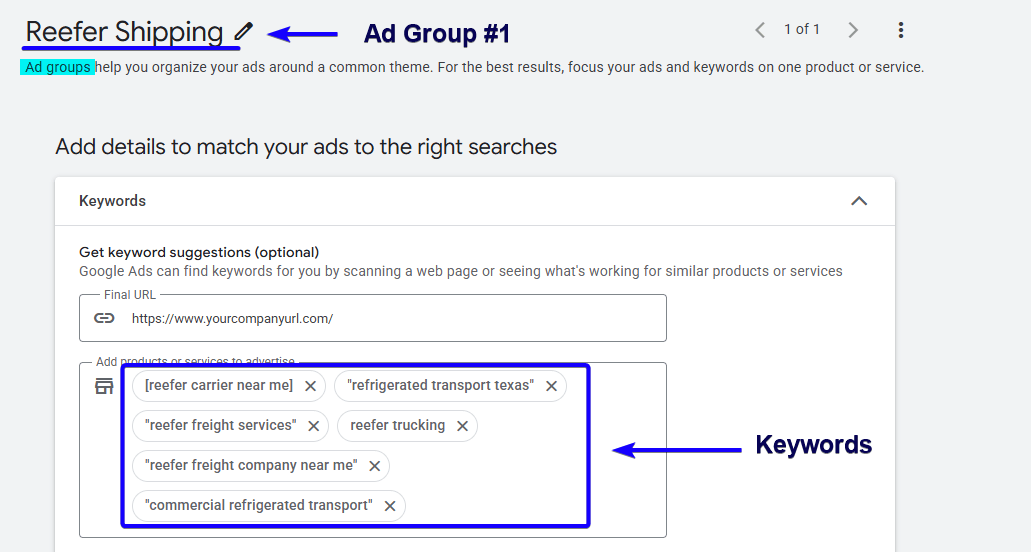
Ad Group
An ad group is a structured container that holds related keywords and matching ads. Separating services into different ad groups improves ad relevance and performance. Each freight type or recruiting focus should have its own ad group.
Example Ad Groups:
- Ad Group #1: Reefer Shipping
- Ad Group #2: Flatbed Services
- Ad Group #3: LTL Freight
- Ad Group #4: CDL Jobs
This keeps ads hyper-relevant.
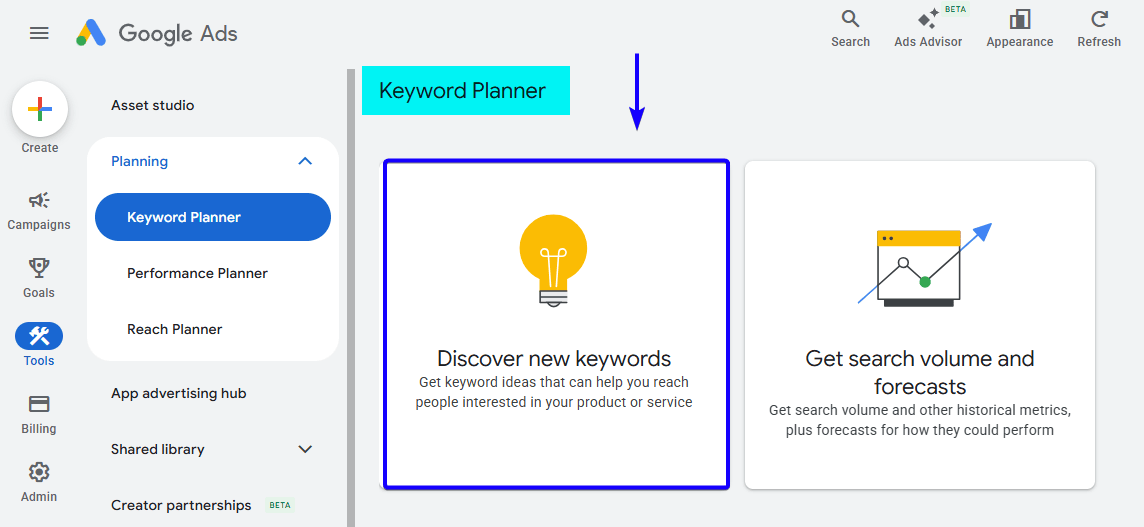
Keyword Planner
Keyword Planner is a research tool inside Google Ads that helps you discover search volume and cost estimates. It allows you to identify freight-related terms specific to Texas markets. Using this tool before launch ensures your campaign is built on real search demand.
Keywords
Keywords are the search phrases people type into Google when looking for services. Choosing specific, high-intent phrases ensures you attract decision-makers rather than researchers. Focus on the phrase and exact match for better control.
Ready to Turn Searches Into Signed Freight Contracts? We’ve helped thousands of businesses generate measurable growth through Google Ads. Let us show you exactly how we can do the same for your trucking company!
Schedule Your Free Consultation Now!
Google Ads for Trucking Companies: Match Types
Match types control how closely someone’s search must match your keyword for your ad to appear. They help you balance reach and precision so you don’t waste budget on irrelevant traffic. Choosing the right match types is critical for attracting serious shippers and qualified CDL drivers.
Broad Match
Broad match is the default keyword setting in Google Ads and allows your ad to show for searches related to your keyword, including variations, synonyms, and related concepts. It gives Google the most flexibility, which can increase reach but also bring in less relevant traffic. Broad match can generate volume, but often requires strong negative keywords to maintain quality.
Example Keyword: reefer trucking houston
Your ad may show for searches like:
- refrigerated freight services
- cold chain logistics texas
- food transport companies
- trucking companies near me
As you can see, some searches may be relevant, while others may be too broad.
Phrase Match (“ ”)
Phrase match allows your ad to appear when a user’s search includes your keyword phrase in the same order, even if additional words appear before or after it. It provides more control than broad match while still capturing variations with strong intent. This is often the safest starting point for trucking campaigns because it balances volume and precision.
Example Keyword: “flatbed carrier dallas”
Your ad may show for:
- best flatbed carrier dallas
- flatbed carrier dallas tx
- reliable flatbed carrier dallas fort worth
But it likely won’t show for:
- trucking companies in texas
- how to become a flatbed driver
Phrase match helps you stay focused on serious freight searches.
Exact Match ([ ])
Exact match gives you the highest level of control by showing your ad only when someone searches for your keyword or a very close variation. It reduces wasted spend and attracts highly targeted traffic. For competitive Texas markets like Houston and Dallas, exact match is powerful for high-value freight keywords.
Example Keyword: [drayage houston port]
Your ad may show for:
- drayage houston port
- houston port drayage
- drayage at port of houston
But it will not show for:
- trucking jobs houston
- container shipping companies worldwide
Exact match protects your budget and keeps traffic extremely relevant.
Which Match Type Should Trucking Companies Use?
For new campaigns, start with:
- Phrase Match for core services
- Exact Match for high-value keywords
- Limited Broad Match only if you have strong negative keywords
This approach keeps your lead quality high while still allowing room to grow.
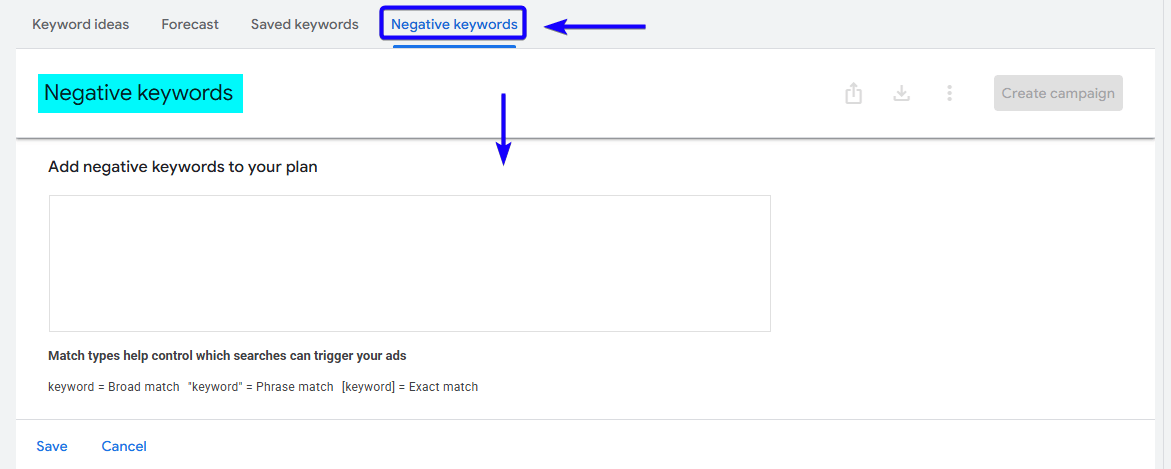
Negative Keywords
Negative keywords prevent your ads from showing for irrelevant searches. They protect your budget from job seekers, students, and informational traffic. A strong negative list improves lead quality dramatically.
Step 7: Craft Your Ad Copy
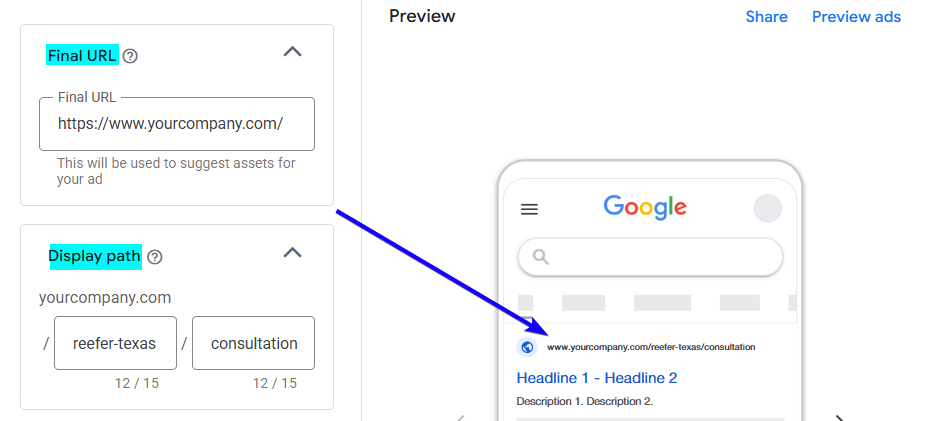
Final URL
The Final URL is the exact page a user lands on after clicking your ad. It should always direct to a specific freight or recruiting page, not your homepage. Relevance between keyword, ad, and landing page improves conversion rates.
Display Path
The Display Path is the simplified URL shown inside your ad. It helps build trust and reinforces relevance. This does not need to match the exact URL, but should clearly reflect the service.
Headlines
Headlines are the most prominent and attention-grabbing part of your ad, appearing at the top of the search result in bold text. They are designed to immediately match what the shipper or driver just searched for and convince them your company is the right choice. Strong headlines include location, service type, and a clear benefit to increase clicks and improve ad performance.
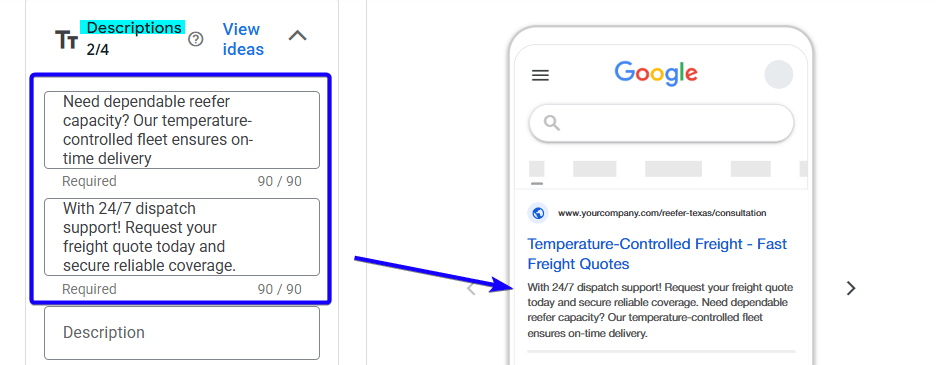
Descriptions
Descriptions are the supporting text below your headlines that explain why someone should choose your trucking company. They provide more detail about your services, reliability, coverage area, and call to action. A strong description builds trust quickly and encourages the reader to request a quote or submit an application.
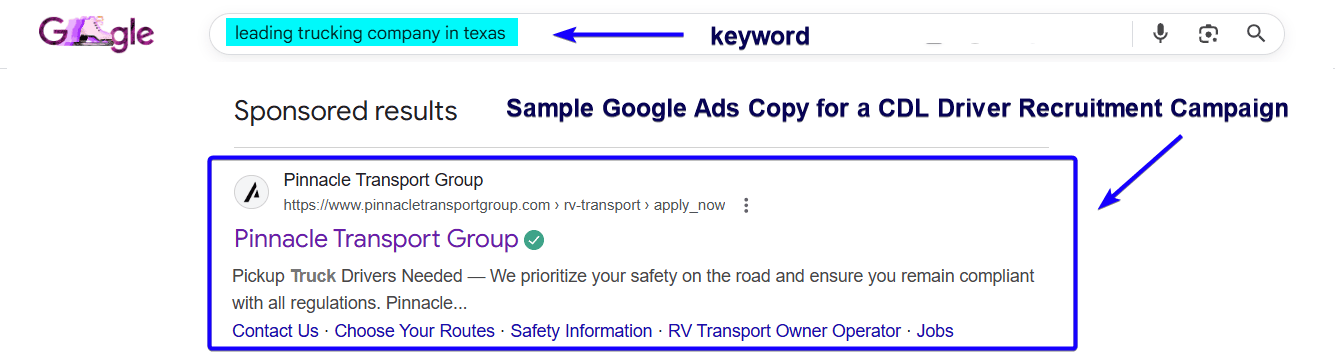
This example shows how a CDL recruitment ad appears directly in Google search results when drivers actively look for jobs.
Step 8: Add Ad Extensions
Sitelinks
Sitelinks are additional clickable links that expand your ad and provide more options to users. They increase visibility and improve click-through rates. They reinforce credibility and services.

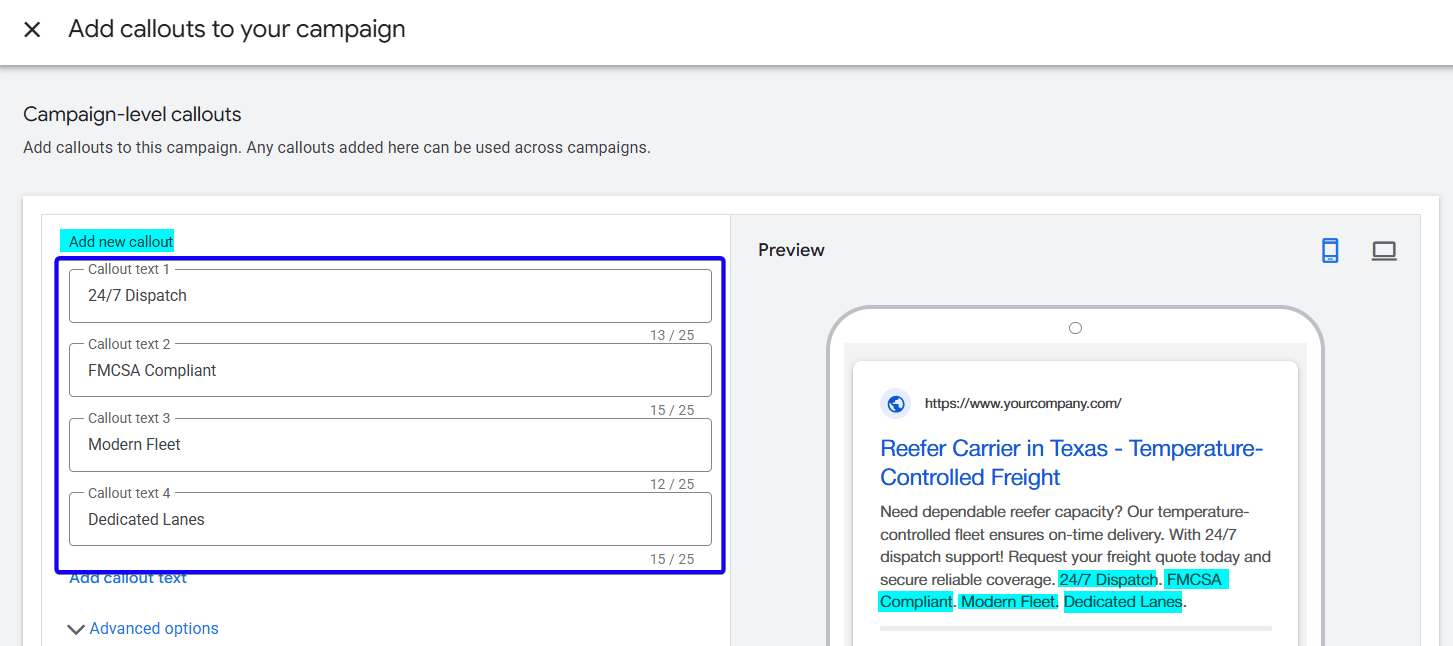
Callouts
Callouts are short, non-clickable highlights that emphasize benefits. They build trust quickly and differentiate your company. Keep them concise and benefit-focused.
Step 9: Review & Launch
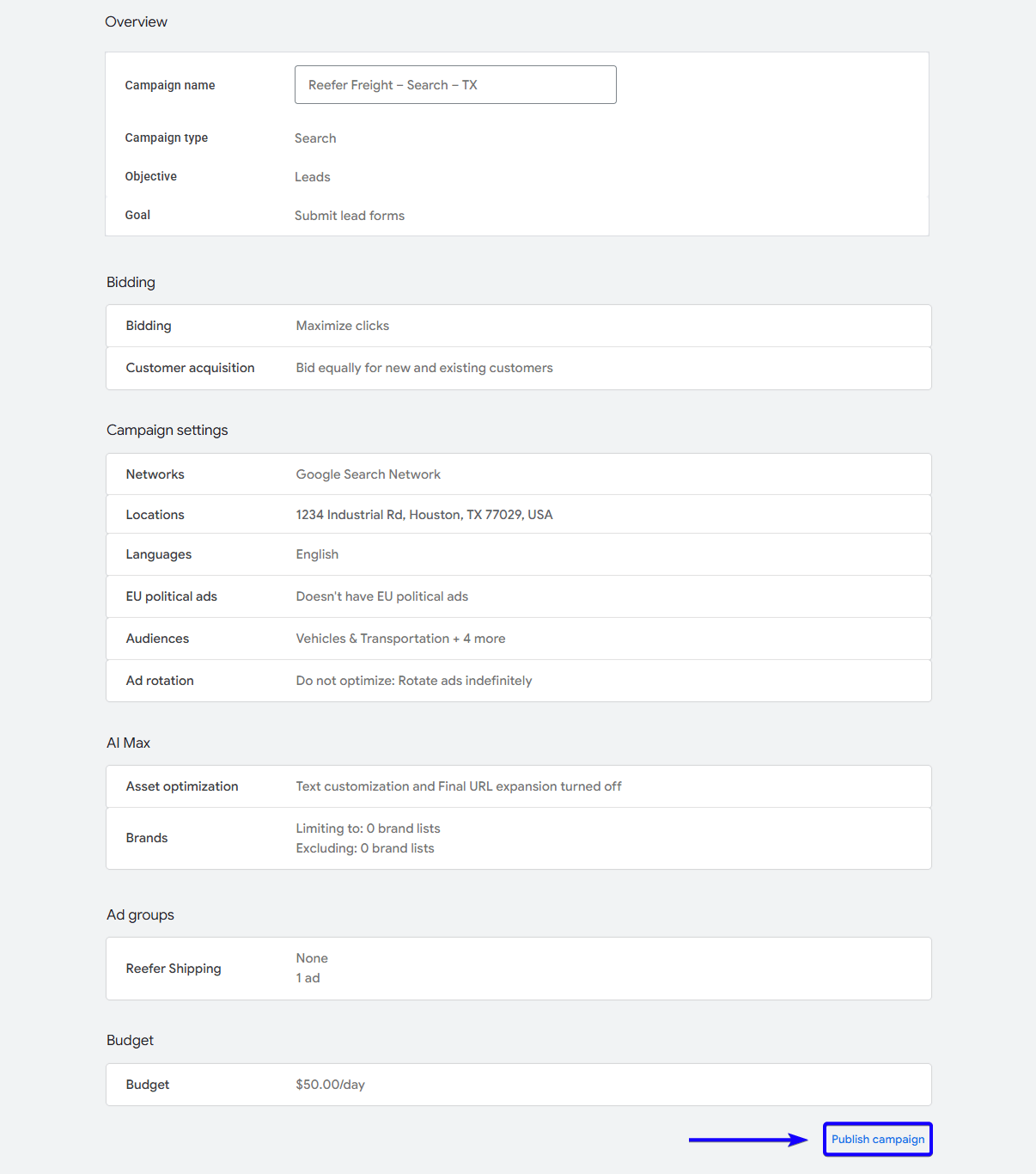
Before launching, double-check your targeting, negative keywords, and landing page links. Make sure Texas locations are set to “Presence” targeting only. Once confirmed, launch and begin monitoring data daily.
Your Competitors Are Already Advertising, Are You? Don’t let high-intent freight leads go to another carrier. Partner with YoYoFuMedia and turn Google into your most reliable source of new contracts and driver applications.
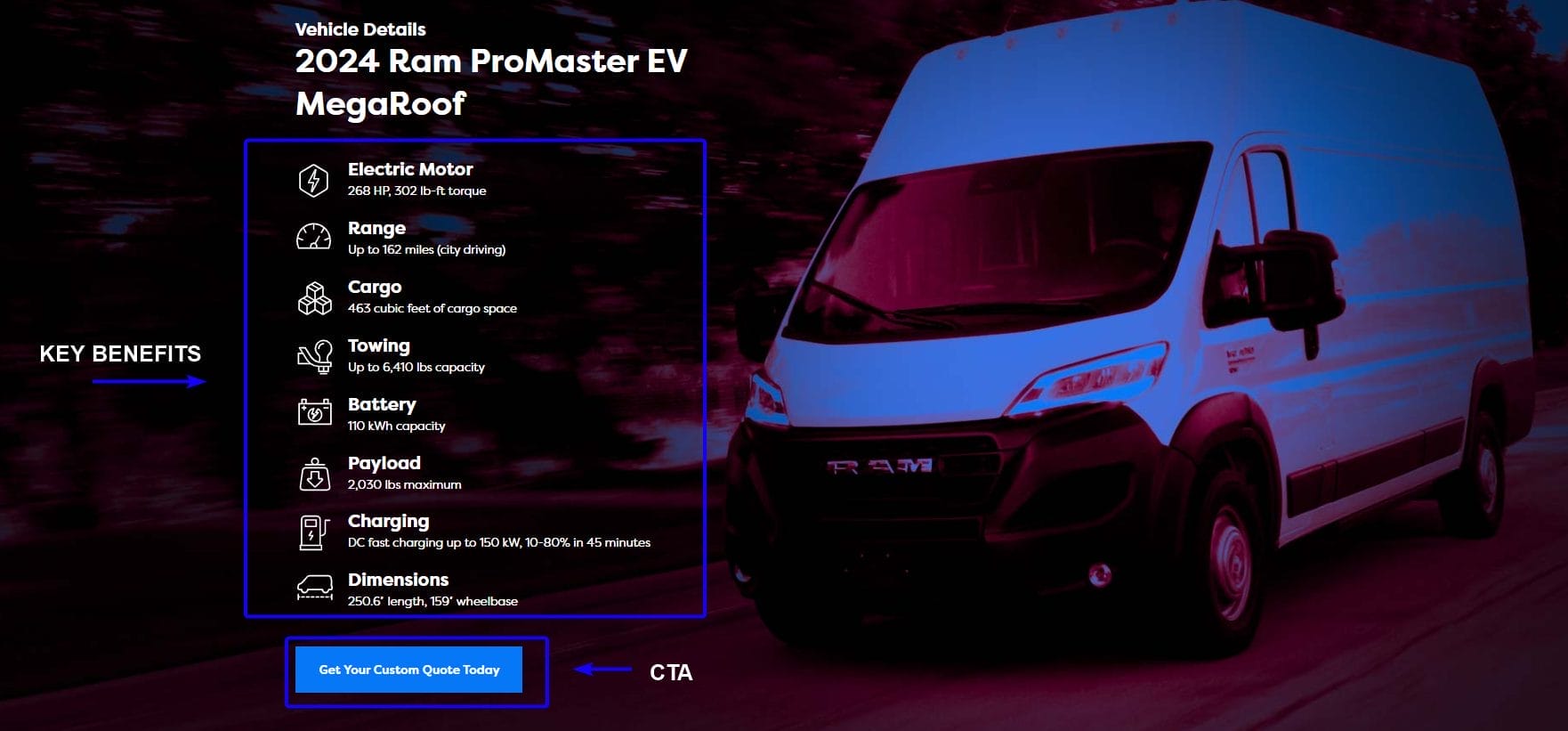
Landing Page for Trucking Companies
A landing page is a focused webpage designed to convert visitors into quote requests or applications. It removes distractions and directs attention toward one primary action. A strong landing page dramatically improves conversion rates compared to a homepage.
Here are the core components every high-converting trucking landing page should include:
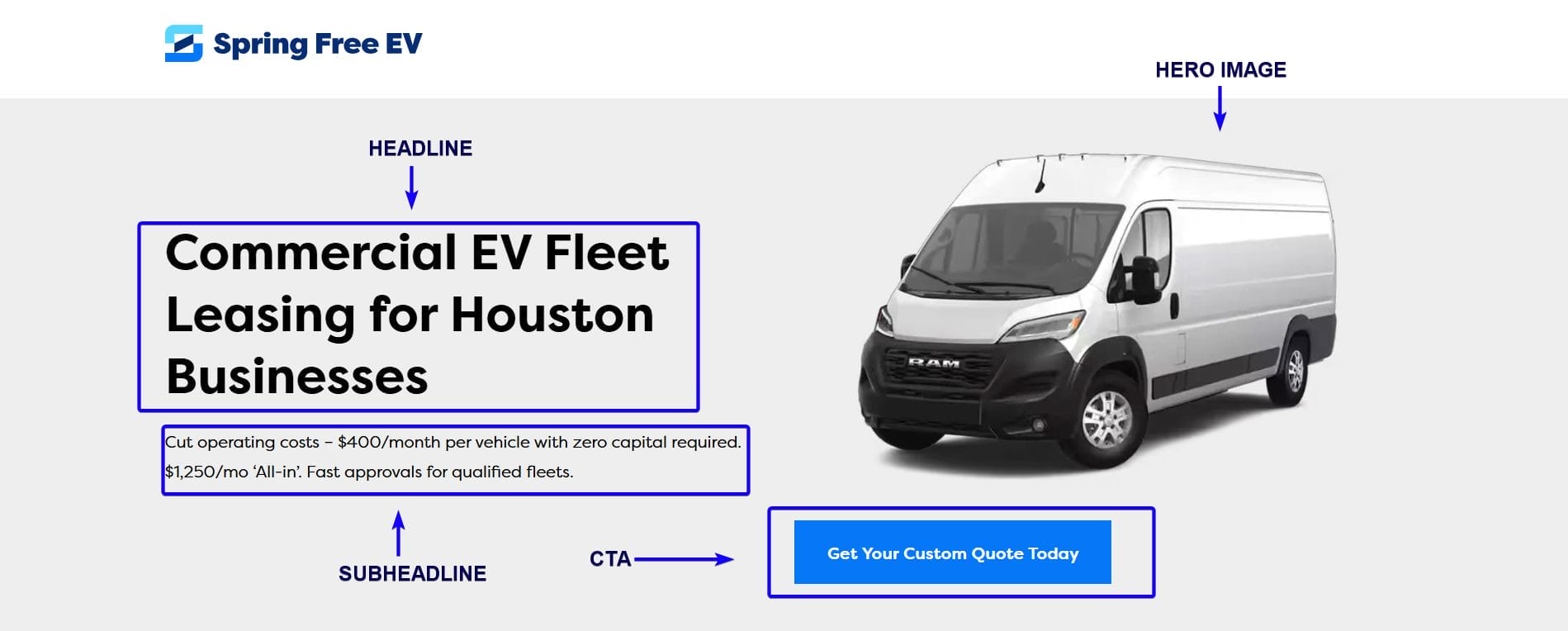
Headline
A headline is the main statement at the top of your landing page that immediately tells visitors they are in the right place. It should match the service and city they searched for, reinforcing relevance and trust. A strong headline reduces bounce rates because it confirms the visitor found exactly what they needed.
Hero Image
A hero image is the large visual element displayed at the top of the landing page. It should visually represent your fleet, equipment, drivers, or operations in action to create instant credibility. High-quality, real images of your trucks build trust faster than generic stock photos.
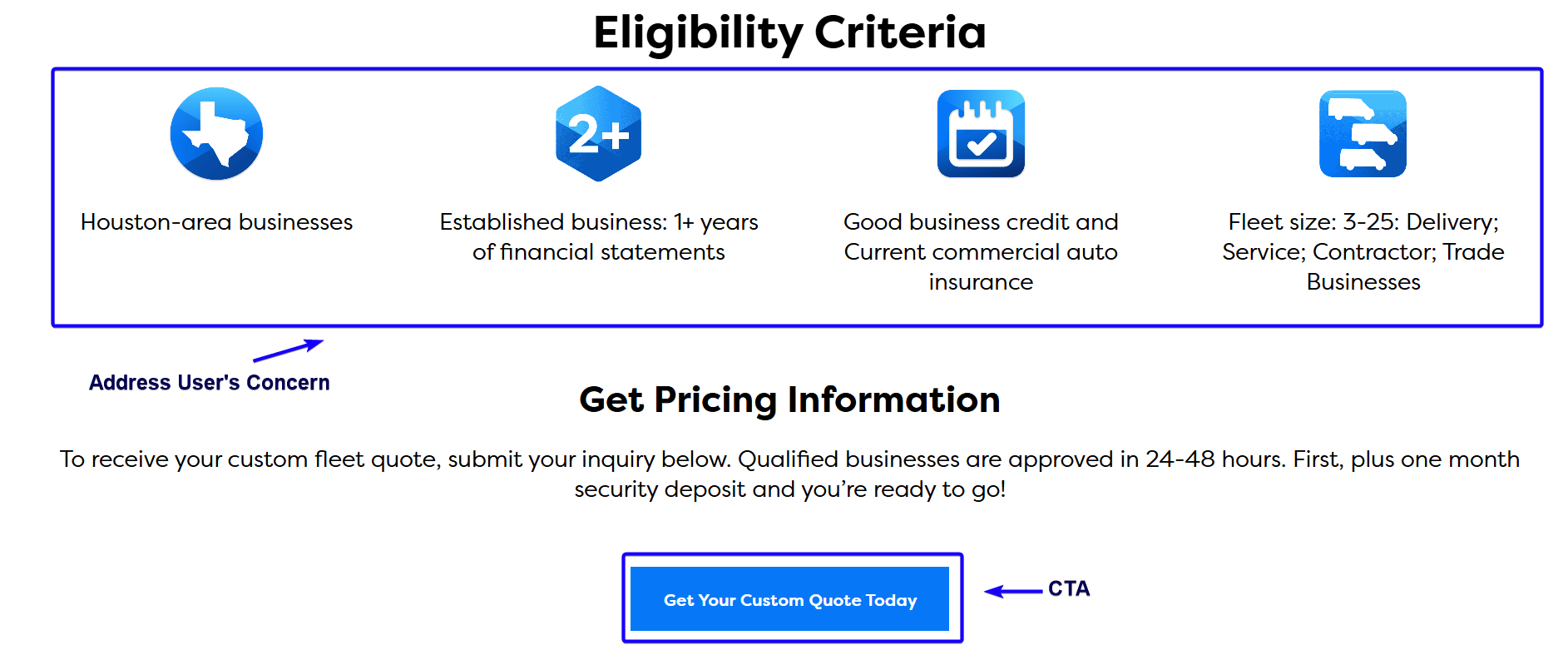
Call-To-Action (CTA)
A call-to-action is a clear instruction that tells visitors exactly what to do next. It usually appears as a button and should use direct, action-oriented language. A strong CTA removes confusion and makes the next step obvious.
Key Benefits Section
The key benefits section explains the outcomes and advantages of working with your company. It focuses on results, reliability, and what makes your service different from competitors. This section helps persuade hesitant visitors who need reassurance before submitting a form.
Unique Selling Proposition (USP)
A unique selling proposition explains what sets your trucking company apart from others. It highlights your competitive advantage, such as specialization, fleet size, service reliability, or years in operation. A strong USP makes it clear why a shipper should choose you over another carrier.
Addressing Concerns
This section proactively answers common objections or questions a shipper or driver may have. It builds confidence by clarifying details about insurance, compliance, rates, response times, or hiring requirements. Removing uncertainty increases the likelihood that visitors will take action.
Short Lead Form
A lead form is the section where visitors submit their contact information and freight details. It should collect only essential information to avoid overwhelming users. The shorter and clearer the form, the higher your conversion rate will be.
Testimonials / Social Proof
Testimonials are real statements from satisfied customers or drivers that validate your reliability. They serve as proof that your company delivers on its promises. Social proof reduces skepticism and increases trust quickly.
Trust Signals
Trust signals are visual or written indicators that show your company is legitimate and professional. They can include DOT numbers, insurance details, safety ratings, certifications, or industry affiliations. These elements reassure shippers that their freight is in safe hands.
Service Area Section
A service area section clearly lists the cities and lanes you cover. This reinforces geographic relevance and improves SEO for your location’s searches. It also prevents confusion about whether you operate in certain regions.
Example of a Landing Page:

Conclusion
Google Ads isn’t just another marketing channel. It puts your trucking company in front of shippers and CDL drivers exactly when they’re searching. In competitive markets, relying only on brokers and load boards limits your control and margins, while Google Ads helps you generate high-intent leads directly.
When set up correctly, Google Ads helps you attract higher-quality freight by targeting shippers who are actively searching for your services. At the same time, it supports more consistent driver recruiting and helps you build a predictable inbound pipeline you can rely on month after month.
That said, while you can follow this guide and launch campaigns yourself, optimizing for real profitability takes experience, data analysis, and ongoing refinement. Small mistakes in targeting, match types, or bidding can quietly drain your budget without producing strong results.
At YoYoFuMedia, we’ve helped thousands of businesses generate measurable growth through expertly managed Google Ads campaigns. We understand how to structure campaigns for high-competition industries and turn ad spend into consistent, qualified leads.
If you’re serious about building a steady flow of freight contracts and driver applications, let our team handle the strategy and optimization while you focus on running your operations. You can also visit our Case Studies page to see real examples of how our clients have achieved success with Google Ads.
Let’s turn your marketing into a reliable growth engine. Connect with YoYoFuMedia today!

