


The way you bid on keywords can make or break your Google Ads campaign. Even if you have a compelling ad, you could be paying a much higher cost than needed by choosing the wrong keywords. Implementing the right Google keyword bidding strategy can significantly lower the cost of acquiring a customer. I’m going to teach you some tips that will improve your Google Ads keyword bidding strategy in 2026. These will help reduce wasted paid ad spend.
What’s Changed in Google Ads Bidding (2019-2026)
Before we dive in, it’s important to know that Google has retired several bidding strategies over the past few years as the platform moves toward fully automated, AI-driven bidding. If you’ve read older guides, here’s what’s no longer available:
- Enhanced CPC (ECPC) was sunset the week of March 31, 2025. Campaigns still using it were migrated to Manual CPC.
- Target Search Page Location and Target Outranking Share were retired in 2019 and migrated to Target Impression Share in mid-2020.
- Average position as a metric was removed in September 2019, replaced by Search top impression rate and Search absolute top impression rate.
The current Google Ads bidding landscape revolves around Smart Bidding, a set of automated strategies that use auction-time signals (device, location, time of day, audience, operating system, and more) to set a bid for every single query. Smart Bidding strategies include Target CPA, Target ROAS, Maximize Conversions, and Maximize Conversion Value.
Automated Bidding Vs Manual Bidding
There are two forms of keyword bidding in Google Ads: manual and automated.
Manual Bidding
Manual CPC bidding is the best way to maintain full control and understand exactly how your ads are performing. You can set bids for either ad groups or specific search keywords. We recommend using the Google Keyword Planner tool to research and select keywords for your ads. Enter keywords that are relevant to your product or service, and the keyword planner will suggest a reasonable starting bid.
Manual CPC is most useful for new accounts that haven’t yet accumulated enough conversion data for Smart Bidding to perform well.
Automated Bidding
Automated bidding strategies are more effective when you have enough data from previous campaigns. The more conversion data you can give Google, the better its machine learning can predict the outcomes of future bids. As a rough guideline, Target CPA performs best with at least 30 conversions in the last 30 days, and Target ROAS needs roughly 50 conversions plus accurate conversion value tracking.
If you don’t have that volume yet, start with Manual CPC, get tracking dialed in, and graduate to Smart Bidding once you have the data to support it.
Understand Each Google Ads Keyword Bidding Strategy
Now that you understand the two forms of bidding, let’s walk through each individual strategy. Your choice will depend on your campaign’s primary goal, whether that’s conversions, traffic, awareness, or video views.
Target CPA (Cost Per Acquisition) – Save Money Generating Sales with Target CPA
Knowing how to choose the right keywords is one of the most critical steps in having a profitable keyword bidding strategy. Target CPA (Cost Per Acquisition) is a Smart Bidding strategy that automatically sets bids to get as many conversions as possible at the target cost per acquisition you specify. It’s one of the most popular bidding strategies for lead generation and ecommerce.
A keyword with a lower cost per click doesn’t necessarily mean it is better than a keyword with a higher cost per click. More traffic at a lower cost per click doesn’t always mean more profit for your business. For example, say you are an entrepreneur that sells custom wine glasses. You target the keyword “wine” and get 1500 visitors a day at $1.60 per click. You also target a more specific keyword “wine glasses” and acquire 300 visitors a day at $2.00 per click.
“Wine glasses” is a more specific keyword to your business and converts into sales at a rate of 15%. The keyword “wine” only converts into sales at a rate of 5% because you don’t sell wine on your website, just wine glasses. Although “wine” is generating 75 sales and “wine glasses” is generating 45 sales, the cost per acquisition is different.
“Wine”: $2400 / 75 sales = $32 CPA
“Wine Glasses”: $600 / 45 sales = $13.33 CPA
The keyword “Wine Glasses” costs you less per customer even though it has a higher price per click than the keyword “Wine”. In this example, the company should put more money toward the keyword “Wine Glasses”.
Note that as of 2022, standalone Target CPA was consolidated into the Maximize Conversions bid strategy with an optional Target CPA setting. The mechanics are the same, but you’ll now find this option inside Maximize Conversions in the Google Ads interface.
Target ROAS (Return On Ad Spend) – The Best Indicator for High-Value Products’ Success

Target ROAS or Return on Ad Spend is one of the best bidding strategies that will help you reach your target return on investment. With a ROAS bid strategy, you are targeting a specific dollar amount from sales instead of the actual number of items people buy. This method is particularly useful for higher-value products because the volume that customers buy isn’t the best indicator of the product’s success.
ROAS is a simple calculation that looks at your returns from what you spent on ads to what you made in conversions. It’s important to note that this calculation doesn’t take your company’s profit margins into account. You can calculate your ROAS by using the formula below:
ROAS = Total Revenue / Cost of Ads
Target ROAS is an automated Smart Bidding strategy that adjusts your bids based on your end goal. Google uses your past conversion data and value data to predict future conversion opportunities and their return. Google will then set bids at auction time to target the average ROAS you specified.
As of 2022, standalone Target ROAS was consolidated into the Maximize Conversion Value bid strategy with an optional Target ROAS setting. To use it effectively, you need accurate conversion value tracking and ideally multiple differentiated conversion values (Google recommends at least two).
Maximize Conversions – Get the Most Conversions Within Your Budget
Maximize Conversions is a fully automated Smart Bidding strategy that uses machine learning to optimize for the highest number of conversions while spending your full daily budget. Google factors in auction-time signals like device, location, operating system, time of day, and audience to maximize conversions.
You can run Maximize Conversions on its own (just spend the budget and get as many conversions as possible), or layer in an optional Target CPA. Adding a Target CPA tells Google to push for conversions only at or near your specified cost per conversion, which gives you more control over cost efficiency.
This is the strategy Google now recommends for most lead-generation campaigns that have enough conversion history to support automation.
Maximize Conversion Value – Optimize for Revenue, Not Just Conversion Count
Maximize Conversion Value is the value-based counterpart to Maximize Conversions. Instead of treating every conversion equally, it bids based on the predicted dollar value of each conversion. A $500 sale gets more aggressive bidding than a $50 sale.
You can run this strategy on its own to spend your budget and maximize total revenue, or layer in an optional Target ROAS to enforce a minimum return on every dollar spent.
This is the go-to strategy for ecommerce, Shopping, and any business with variable order values. It requires accurate conversion value tracking to work properly, so make sure your ecommerce tracking is clean before turning it on.
Target CPC (Cost Per Click) – A Highly Effective Google Ads Keyword Bidding Strategy

If your Google Ads campaign goal is to generate more traffic for your website, the Target CPC (Cost Per Click) bidding strategy is one of the easiest ways to do that. There are two ways that you can best target CPC for your ad campaign. The first is to manually set your maximum CPC bid for each ad that you run. The second way you can target CPC is to maximize clicks by setting a daily budget automatically.
Manual bidding is for advertisers who want to understand which ads and keywords are performing best. The maximize clicks bidding strategy, on the other hand, allows Google Ads to manage your bids to get the most clicks possible with the budget that you have set. We recommend using manual bidding when targeting cost per click because it gives you the most control over how well your ads perform.
The most important aspect of manual bidding is knowing how to calculate your max CPC bids. We’re going to show you how to calculate your max CPC bids from your conversion rate and conversion value. Before we can do this, you need to know your revenue per click for the ads you are running.
This data is readily available for you under the conversion column in your Google Ads account. The metric you are looking for is the conversion value per click. This is your total conversion value divided by the number of single clicks. Now that you know where to find this metric, you can calculate your max CPC bids from your conversion rate and conversion value. You can find your max CPC by using the formula below:
(Average Conversion Value / Desired ROAS) x (Conversion Rate) = Max CPC Bid
To show you an example of how to calculate your max CPC bid, let’s say you are running an ad for tennis shoes. The metrics for your ad are as follows:
Average conversion value = $425
Desired ROAS = 250%
Conversion Rate = 5%
($425 / 250) x 5 = $8.50
By plugging these metrics into the formula, you would get a max CPC bid of $8.50.
Maximize Clicks – Drive Traffic When You Don’t Have Conversion Data Yet
Maximize Clicks is an automated bidding strategy that aims to bring you as many clicks as possible within your daily budget. Google handles the bid-setting automatically, so you don’t need to manage individual keyword bids.
This strategy is useful when:
- You’re launching a new campaign and don’t have enough conversion data for Smart Bidding
- Your primary goal is traffic volume, not conversions (think top-of-funnel awareness campaigns)
- You want to seed an account with click data before transitioning to a conversion-based strategy
You can set a max CPC bid limit to prevent Google from spending too aggressively on any single click. The downside of Maximize Clicks is that it optimizes for click volume, not conversion quality, so you may get plenty of traffic that doesn’t convert. Use it as a starting point, not a long-term strategy.
Target CPM (Cost Per Thousand Impressions) – Increase Brand Visibility For Your Business

Cost per thousand impressions or CPM is a manual bidding strategy where you pay for every 1,000 views your ad receives on the Google Display Network or YouTube. This particular bid strategy is excellent for maximizing your company’s visibility and outreach. You should NOT use this bidding strategy to acquire leads or landing page traffic, as there are more effective bid strategies for that.
With the CPM bid strategy, you pay for the number of people who see your ad, whether they click your ad or not. CPM bidding is available for Display and Video campaigns. Google also offers tCPM (Target CPM) for Video campaigns, which averages your CPM across the campaign rather than charging per individual impression, and vCPM (Viewable CPM), which charges only for impressions that meet viewability standards.
We recommend using CPM-based bidding for campaigns focused on brand awareness. Don’t waste your paid ad spend on this strategy if your goal is conversions.
Target CPV (Cost Per View) – Boost Your Video’s Audience

This Google Ads keyword bidding strategy is excellent for improving the awareness of your video. Target CPV (Cost Per View) can only be used for video ads on YouTube. With this manual bidding strategy, you are only paying for views and engagements with your video. Engagements include clicks on video overlays, cards, and banners.
Google Ads charges you for a view once a user has watched at least thirty seconds of your video (or the full video, if it’s shorter than 30 seconds) or has interacted with your ad. Only use this bidding strategy if the goal of your campaign is to generate awareness for a company video. This form of advertising can be a great jump start for a video to attract more organic traffic.
Target Impression Share – Maximize your Product and Brand Awareness
Target Impression Share is the modern replacement for the old Target Search Page Location and Target Outranking Share strategies (both retired in 2019/2020). It’s an automated bidding strategy aimed at improving brand awareness and getting your ad in front of as many users as possible for a given keyword.
Target Impression Share gives you three placement options:
- Absolute top of the page (the very first ad position)
- Top of the page (any ad position above the organic results)
- Anywhere on the search results page
For example, if you sell custom coffee mugs, you can set your target impression share to 100% on “custom coffee mugs” to dominate that keyword’s search results. You also set a maximum CPC bid limit to prevent runaway costs.

Target Impression Share can be a great way to maximize brand awareness if done correctly. Keep in mind that costs can add up fast if you set your target at 100%, especially for “Absolute top of page” placement. Always set a sensible max CPC bid limit and a daily budget when using this strategy. This type of bidding works best for branded keywords and lower-competition awareness terms, not high-intent commercial keywords where the cost of impression share dominance will eat your margins.
Performance Max – Google’s Fully Automated Campaign Type
Performance Max isn’t strictly a bidding strategy, it’s a campaign type, but it’s central to how Google wants advertisers running ads in 2026, so it’s worth covering here. Performance Max uses Google’s AI to serve ads across every Google inventory in a single campaign: Search, Display, YouTube, Gmail, Discover, and Maps. You give Google your assets (headlines, descriptions, images, videos, logos) and a conversion goal, and the algorithm handles targeting, bidding, and placement.
Under the hood, Performance Max uses either Maximize Conversions or Maximize Conversion Value as its bidding strategy, with optional Target CPA or Target ROAS.
Performance Max works well for:
- Ecommerce stores with solid conversion value tracking
- Advertisers who want broad reach without managing multiple campaign types
- Accounts with enough conversion volume for the AI to optimize against
It’s less ideal for advertisers who want granular control over keywords, placements, and creative pairings. PMax is a “trust the algorithm” play, so feed it clean data and quality assets, then let it run.
Determine Which Google Ads Bidding Strategies to Use

Now that you understand each bid strategy, you need to determine which ones are best for you. Selecting which bid strategies will benefit you the most depends on your campaign goals. Each ad campaign you create should have a selected bidding strategy based on the specific outcome you want.
We recommend testing different bid strategies for a couple of weeks and analyzing performance changes. Measure your key performance indicators (conversions, conversion rate, cost per conversion, ROAS) for each bidding strategy you use. Below we map out common campaign goals and the Google Ads bidding strategies we recommend for each.
Campaign Goal: Maximize Conversions (Lead Gen)
If your Google Ad campaign goal is to receive more conversions or to turn website traffic into leads, we recommend the following bid strategies:
- Maximize Conversions (with optional Target CPA)
- Manual CPC (for new accounts without conversion data yet)
Campaign Goal: Maximize Revenue (Ecommerce)
If your goal is to maximize revenue, not just conversion count, use a value-based strategy:
- Maximize Conversion Value (with optional Target ROAS)
- Performance Max (for accounts with strong conversion value tracking)
Campaign Goal: Drive Website Traffic
If your goal is to drive more traffic to your website or landing page (not necessarily to convert), use:
- Maximize Clicks
- Manual CPC (Cost Per Click) Bidding
Campaign Goal: Increase Brand Awareness
If the goal of your campaign is to increase brand awareness and reputation, use:
- Target Impression Share (for search campaigns)
- Target CPM or vCPM (for display and video)
- Target CPV (Cost Per View) for YouTube
Tactics to Improve Your Google Ads Bidding Strategies
Once you have decided what to target, you can implement these tactics to improve your Google Ads. These tips will help you boost ad performance and lower wasted ad spend regardless of which bid strategy you choose.
Increase your Google Ad Quality Score – It Will Lower Your Bidding Price

One of the best ways to lower your bidding price is by increasing your ad quality score. Your quality score depends on multiple factors, including:
- Click-through rate (CTR)
- Landing page quality and relevance
- The relevance of each keyword to its ad group
- The relevance of your ad itself
Google doesn’t automatically choose the highest bidder in a keyword auction. Your ad quality score plays a vital role in the Google Ads bidding system. The simplified formula for how you rank on Google Ads looks like this:
Your Ad’s Quality Score x Ad’s Max Bid Per Click = Your Real Bid
If you have a high ad quality score but a low cost per click, you can still beat competitors who have a higher cost per click but a low quality score.
Google designs auctions this way because they only want relevant ads to appear for keywords. Your ad can still win an auction even if it isn’t perfectly relevant, but it will cost you a lot more to do so.
Utilize Negative Keywords – It Increases Conversions

Negative keywords can be your greatest ally when it comes to increasing conversions. So what are negative keywords? In short, they prevent your ads from being displayed for Google search queries unrelated to your products and services.
Using these keywords is extremely helpful in sculpting the traffic you receive from your ads. For example, let’s say you are an artist trying to sell sculptures. By targeting the keyword “sculptures,” this would also include “how to make sculptures”. That’s not relevant to your store, as you only sell completed sculptures, not guidance on how to make them.
In this example, you would add the word “make” to your negative keywords list. Any Google search query containing the word “make” would not trigger your ad. By utilizing negative keywords, you will quickly see the conversion rate on your ads increase.
By increasing your conversion rate with negative keywords, you’ll also see your cost per conversion decrease, because you need to spend less to get the sale. Your click-through rate will also increase because your ads only show on Google search queries that are relevant to your business.
This is especially important under Smart Bidding. When Google’s AI is making the bidding decisions, the cleanliness of the traffic you let into your campaign directly shapes what the algorithm learns. A well-maintained negative keyword list is one of the highest-leverage tasks in modern Google Ads management.
Setup Bid Adjustments – Optimize your Google Ad Spend Based on Performance
When running Google Ads, several different metrics affect campaign performance, including time of day, day of week, device, and location. All of these metrics are sortable and trackable, making them a vital tool for your success. You should review these segments and set bid adjustments to maximize performance.
A quick note on Smart Bidding: when you use a Smart Bidding strategy like Maximize Conversions or Target ROAS, most bid adjustments are ignored because Google’s algorithm already factors in device, location, time of day, and audience at auction time. The exception is the device bid adjustment of -100%, which you can still use to fully exclude a device. For Manual CPC and Maximize Clicks campaigns, all bid adjustments still apply normally.
You can run reports based on these metrics and analyze where to increase or decrease bids based on performance. To view day-of-week or time-of-day performance, segment your campaign by Day or Hour in the main campaigns view, or navigate to Insights and reports > Report editor.

Use this report to analyze whether you should pause advertising during certain hours or days because the cost per conversion is too high. For example, you might find that Mondays and Tuesdays have lower costs per conversion, meaning you could target those days specifically.
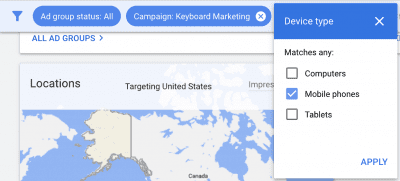
For device performance, segment your campaigns by device. For example, you might find that mobile phones are driving conversions at a higher cost. If you’re running Manual CPC, you could set a 20% negative bid adjustment on mobile phones for that campaign. If you’re running Smart Bidding, you’d need to either let the algorithm handle it or set the adjustment to -100% to exclude mobile entirely.
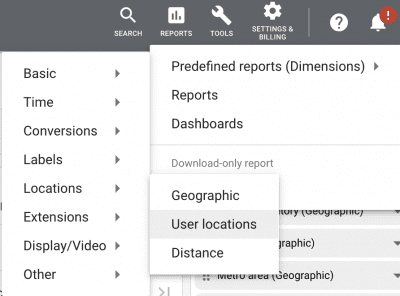
To see geographic performance, navigate to your campaign and click Locations > User locations. You might find that Los Angeles is driving conversions at a lower cost than other cities. In a Manual CPC campaign, you could set a 20% positive bid adjustment for Los Angeles. Under Smart Bidding, the algorithm will already weight high-performing locations heavier on its own.
Create Automated Rules – Make Your Strategy Automated
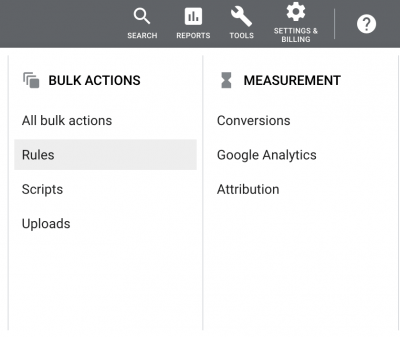
One way you can optimize your bids for cost efficiency is to set automated rules. These rules can pause, enable, change bids, or change budgets based on parameters you choose. You can create rules in your Google Ads account by navigating to Tools > Bulk actions > Rules.
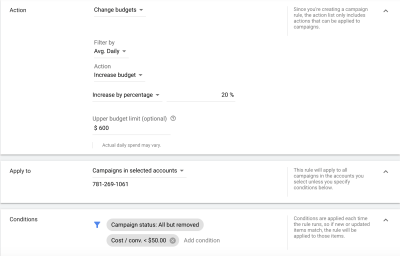
You can create rules at the campaign, ad group, ad, or keyword level. For example, you can create a rule to raise bids by a percentage if the average cost per conversion is below a certain number. You can also raise bids if your Search top impression share drops below a target (this replaced the old “average position” metric, which was retired in 2019). There are many different outcomes you can get by setting different conditions. Automated rules are a great tool that saves time and money while ensuring your ads are running efficiently.
Apply Bidding Scripts – Customize Your Automated Google Ads Strategy
Applying Google Ads scripts is a great way to further automate your activity in Google Ads. Scripts allow far more customization than basic automated rules. There are hundreds of free Google Ads scripts you can set up based on the metrics you want to control.
Google Ads scripts are JavaScript code that you can copy and paste into your account to perform a wide variety of functions. These scripts can pause ads with low click-through rates, increase bids on cheap conversion keywords, monitor budget pacing, alert you to broken landing pages, audit search terms, and much more. If there’s a task in Google Ads that you want automated, chances are someone has already written a script for it. Check Google’s official scripts solutions library for a curated starting point.
Final Thoughts on Google Ads Bidding in 2026
The biggest shift in Google Ads over the past few years has been the move from manual control to AI-driven automation. Strategies like Enhanced CPC, Target Search Page Location, and Target Outranking Share have been retired in favor of Smart Bidding and Performance Max. Whether that’s good or bad for your account depends on your data, your patience for the learning period, and how clean your conversion tracking is.
Our recommendation: get the inputs right. Clean conversion tracking, accurate conversion values, well-maintained negative keyword lists, strong ad copy, and high-quality landing pages will determine your success more than which bidding strategy you pick. Once those fundamentals are in place, test Smart Bidding strategies against Manual CPC and let the data tell you what works best for your business.
If you’d like help auditing your current Google Ads bidding setup or migrating off legacy strategies, book a free consult with our team.

