


Last Update: August 31, 2026
In this article, we will show you how to use Google Ads will help you acquire new high quality cremation leads for your funeral business, increase sales by boosting your online presence, and give you a competitive advantage over your local competitors.
1. What are Google Ads?
Google Ads are online paid advertisements that use the pay-per-click system, and you are only charged when someone clicks on your ad. The higher the bid the more likely your Google Ads will appear at the top of the search engine results page, increasing traffic towards your funeral business, just like the examples in the image below.

2. Why Google Ads for Cremation and Funeral Businesses?
Creating Google Ads for cremation and funeral services will bring your business faster results than other marketing strategies, like Search Engine Optimization. It gives you full control over your campaign and ad spending, and you can optimize your campaign settings to bring you more new customers to increase your return on investment (ROI).
Google Ads provides you with a detailed analysis of the performance of your ads, so you can continuously optimize them to help you get better results each time.
Important note on Google Ads for Cremation and Funeral Businesses. Google classifies bereavement as a personal hardship under its Personalized Advertising policy. Google’s stance is that the ads should not exploit the difficulties or struggles of users, so it limits how you can target people based on grief or loss. In short, this can affect certain aspects in Google Ads such as:
- Remarketing lists (this is when you retarget people who have previously visited your funeral website)
- Customer Match – Uploading a customer list to target
- Interest-based or “in-market” audience targeting built around bereavement.
In Google Ads for cremation and funeral businesses, the main policy to keep in mind is that Google won’t allow you to target people based on a personal loss or if they seem to be grieving. In short, a family clicking on your ad after searching for “local funeral services” is fine, but you can’t create a custom list of “recently bereaved” users and target them across the web.
3. Understanding Google Ads
Understanding the key features and structure of your Google Ads will help you set up your campaign more effectively to bring you high-quality leads.
The Campaign contains all your ad groups, keywords, and preferred Google Ads settings, and under your campaign are your Ad Groups. These usually follow a main theme and it is where your chosen keywords can be located. Your Keywords are the specific key terms or phrases under your ad groups, and these will usually be the terms potential customers will search on search engines for when looking for funeral services.
Want to get started on your Google Ads for funeral services?
4. Create Google Ads for Funeral Services
First, access ads.google.com and sign up by clicking on “Start Now”. If you already have an existing Google ads account, simply log in. If you don’t have an existing account, “Sign up” using your email.

You will then see your Google Ads Dashboard. Click “Add New Campain”

4.1 Campaign Settings
For your campaign objective, select “Create a campaign without a goal’s guidance”. Selecting this option allows you to have more control over your Google Ads for Funeral Services. It will also allow you to implement different strategies to make your campaign more effective.

Next is the campaign type. Select “Search“.
The search campaign type is ideal for you if it’s your first time creating Google ads due to its functionality and because this is the campaign type that will help your Google ads appear at the top of search engine results pages.

Choose the goals you want your campaign to focus on, such as booking appointments, requesting a quote from your funeral business, or contacting you.

Then enter your campaign name. For example, you could enter your funeral business name, and then add Search Campaign, just like the example below.

4.2 Network Settings
For your network settings, make sure to disable both the Search Partners and Display Networks.
The Search Partners Network can often include less direct search portals, and the Display Network focuses on general Browse behavior rather than acute distress.
By focusing exclusively on the main Google Search Network, your ads appear directly in front of individuals who are explicitly searching for funeral or cremation assistance, guaranteeing your message reaches those with the most immediate and profound need for your services.

4.3 Location Settings
In your location settings, you can start targeting demographics as part of your strategy to help maximize the performance of your Google ads for funeral services.
Select “Enter another location,” then enter the specific location you want to target. For this example, we will use Los Angeles, California.

When you’ve entered your location, ensure that “Presence: People in or regularly in your included locations” is the selected target option. This will make sure that your compassionate services appear to those who are physically within your service area and require immediate assistance, ensuring your budget helps families precisely when and where they need it most.

If your funeral business operates in more than one location, select “Advanced Search”, then enter all the locations where you offer funeral services.
You can also choose to only show your Google ads for funeral services within a specific target demographic by using the radius setting. We recommend not entering a number higher than 15 miles since potential customers may not travel further than that distance, and because it may be more cost-effective for your business to only travel up to that distance.

You can also set up a bidding strategy in your location settings for your Google ads for funeral services. For instance, you can bid higher the closer the location is to your funeral business, and you can bid lower the further away it is.
Do you want to implement location bidding strategies in your campaign?
4.4 Language Settings
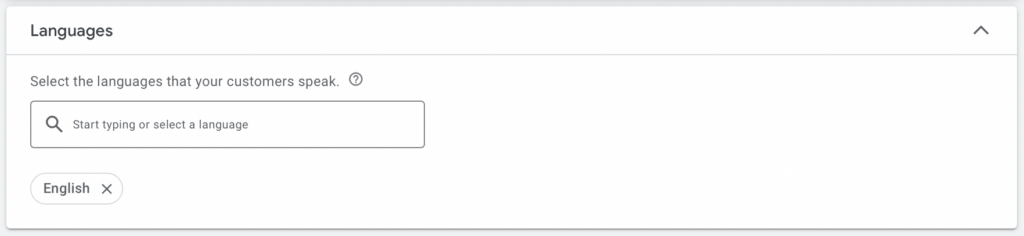
For your language settings, select the language you want your Google ads to appear in. If your funeral business offers services in another language, you will need to create a completely new campaign for that specific language.
4.5 Audience Segments
The audience segment settings will sometimes depend on your industry. To add audience segments to your campaign, enter your niche or industry “Funeral Services” then select which segments you want to include, and make sure “Observation” is the selected targeting setting. This will make sure that your reach will not be narrowed by your audience segments alone.
If your funeral business offers funeral services to all ages, you can skip this step.

4.6 Ad Rotation and Ad Schedule
For your ad rotation settings, select “Do not optimize”. Choosing this option will ensure that all your ads will rotate indefinitely but also equally until you decide to stop. This will also allow your ads to give you enough data insight into which ads are performing well and which ones are not, so you can understand what your potential customers are actively searching for.

If your funeral business offers 24/7 customer care support, make sure that your ad schedule is set up to “All days” and don’t set specific hours.

5. Ad Groups & Keywords
As mentioned at the beginning of this article, ad groups are part of your campaign, and your ad groups will contain all your keywords. It is important to conduct keyword research before creating your Google ads for funeral services, to ensure that your ad will show up to the right keywords, ensuring high-quality leads in return.
Start by entering your ad group name, then enter the products or services that align with the ad group theme. For instance, you could have an ad group for specific products of your funeral business, such as merchandise.
Ad group name: “Funeral Merchandise Los Angeles”
Keywords: “funeral casket”, “funeral urn”, “burial vault”, “cremation merchandise”, “creation jewelry”, “adult casket”, “child casket”, “rental casket”.

Another ad group you could have for your campaign is for the most common services you offer your customers, which could be “funeral services”, “funeral financing”, “cremation services”, “embalming”, “funeral planning”, “visitation”, “committal service”, “memorial service” and more.

Once you have entered your ad group name and your keywords, click on “Get Keyword Suggestion”.
You will find all suggested keywords in the text box. You can also choose to remove specific keywords that may be irrelevant to your products or services, such as “cremation for pets”, and even add other keywords not on the text box, like “funeral financing”.

Not sure which keywords will make your campaign more effective?
5.1 Keyword Match Types
Before creating the ad text of your campaign, you will first need to categorize or format your keywords into specific match types. Using specific keyword match types will effectively trigger your Google ads for funeral services to show u on Google’s SERP.
Broad match types: Key terms that generally relate to your chosen keywords. These can also be misspellings of the keywords and usually have the highest reach but the lowest relevance.
Phrase match: Key terms usually within a phrase or close variations of that phrase. These can also include the meaning of the keyword and keywords of this match type are formatted by putting the keyword inside quotation marks, for example: “keyword”
Exact match: Key terms or queries that exactly match your keyword or your keyword’s meaning. They usually have the highest relevance to the keywords in your Google Ads for funeral services campaign but also have the lowest reach in comparison to broad match and phrase match. Keywords in this match type will need to be categorized by putting them in brackets, for example: [keyword]
You can use free tools like Keyword Match Type Tool to help you format all your keywords into match types, instead of formatting each keyword which can be time-consuming.

6. Google Text Ad for Funeral Services
6.1 Final URL and Display Path
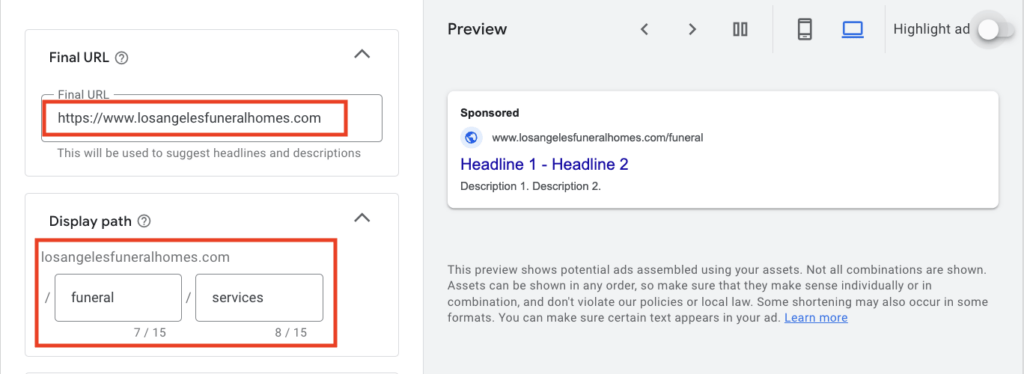
In this section, you can start creating the ad text of your Google ads for funeral services by first entering your Final URL and Display path. Enter the website of your funeral business in the final URL, and then enter the key terms relevant to what your Google ads is advertising. The display path mainly informs the user about the page they will be directed to once they click on your ad.
6.2 Headlines
Next is your headlines. You want to include key terms or keywords in your headlines that will grab the attention of your target audience, which you can do by including the name and location of your funeral business, and the most common funeral services you offer.
In this example, we included 8 headlines, but you can use up to 15 headlines per ad campaign with a maximum of 30 characters each. Some of the headlines in the example used are: “Funeral Homes, Los Angeles”, “Traditional Funeral Services”, “Funeral Pre-Planning Services” and “Funeral Home Services Near Me”.

If you want to make use of all 15 headlines but aren’t sure what other keywords to include, click on “More ideas” and Google will provide you with headline suggestions containing the top keywords based on your niche or industry, and the keywords you added in your ad group.

6.3 Descriptions
After adding your headlines, enter your descriptions. You can include up to 4 descriptions per ad, and each description has a maximum of 90 characters.
Highlight the best features of your funeral business in your descriptions, such as being able to offer your services for all faiths, religions, and nationalities, or you can also include the years your funeral business has been operating for, which will help your Google ads for funeral services increase it’s CTC or click-through-rate.
Some of the descriptions in this example, which you can use as inspiration or guide are the following:
- “LA Funeral Homes is dedicated to serving families of all faiths, nationalities, and beliefs”
- “Experienced funeral directors for funeral services with compassion, dignity and respect”
- “Offering immediate, dignified, memorable and personalized funeral services”
- “Professionals dedicated to excellence in Cremation and Burial Services since 1990”

6.4 Ad Assets
Another way to increase your click-through rate is by adding ad assets to your Google ads for funeral services. There are different ad assets you can add, such as structured snippets, lead forms, promotions, apps, and prices. For your campaign, we recommend adding sitelink ad assets, callout assets and call assets.
Sitelink ad assets work by including direct links to specific landing pages on your ad, to encourage the user to click on these sitelinks and complete their conversion journey.
When creating sitelinks, you can include up to 4 sitelinks for your Google ads for funeral services. Consider including specific services most people usually inquire about when they contact your funeral business, for example, “Funeral Services”, “Funeral Financing”, “Cremation Services” and “Funeral Pre-Planning”. For each sitelink, include 2 descriptions, and include the landing page for each service under the Final URL section.
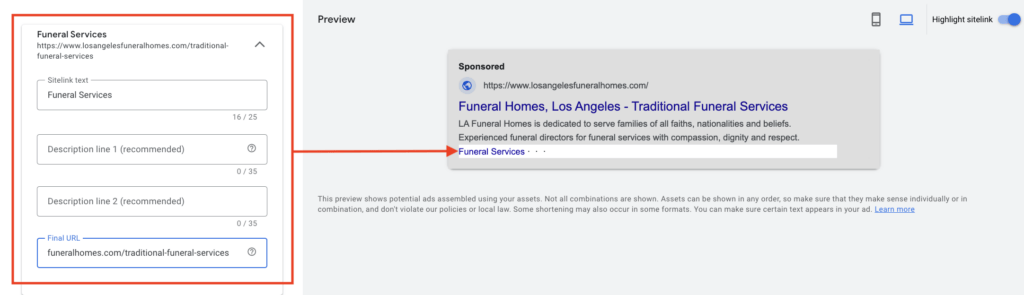
Once you have created all 4 of your sitelinks, select them then click “Add“.

When adding callout assets, include short key information that will also help convert users to click on your ad, for instance, adding your funeral business name, “24/7 Customer Care”, and “Immediate Need Services”. You will also see a preview of where your callouts will be seen on your ad.

Lastly, if your funeral business offers immediate or at-need services, you will want to include call assets so potential customers can directly call you from your ad without having to click on it.

Do you want to include more ad assets in your Google ads for funeral services?
7. Manual CPC and Bidding
Your next setting is setting up your manual Cost per click or budget. Before deciding on your daily budget amount, you will first need to consider your industry, the competition level based on your location, the average top-of-page bids, and the average search volume of your chosen keywords.
Google will recommend an average daily budget amount, but if this amount is too high, simply select “Set custom budget” instead.

Enter a starting budget amount for your Google ads for funeral services campaign, such as $50. We don’t recommend entering an amount that might be too low considering your industry, because it may not provide you with enough measurable data to analyze and optimize your campaign. Similarly, entering a very low amount may cause your Google ads campaign to take longer to produce results.
Google will provide you with an estimate of the expected performance metrics for your campaign based on your custom budget, which includes the estimated weekly clicks, average CPC, and weekly cost. These are only estimates, so keep in mind that these could be surpassed if your Google Ads perform better than the expected metrics.

Ensure that when you set up your bidding settings for your Google Ads for funeral services, “Clicks” is the focus of your bidding. Skip the Customer Acquisition settings, but make sure this option is not selected, so your ad is not limited to new customers only.

Review your settings one last time and ensure all information is correct before publishing your campaign. Once you are happy with your settings, select “Publish campaign,” and you’re done!

How Much Do Google Ads Cost for Funeral Services in 2026?
One of the first questions every funeral business owner asks is “What is this actually going to cost me?” Google Ads costs will depend on your local market and competition, but 2026 benchmark data can give us solid reference points:

A $3.85 average CPC sounds nice, but in reality, high-intent keywords like “cremation services near me” or “funeral home near me” will cost more because those are searchers ready to make a decision immediately. For competitive metros like LA, clicks will often reach $20 or more.
For most cremation and funeral service businesses, a monthly budget of $1000 to $2000 is a great starting point. You could start with a smaller budget, but keep in mind that you may not get enough traffic to gather real data or generate consistent calls. Ultimately, if a lead ends up costing $58, it can be easily justifiable with a single traditional service or cremation case that is worth $3000 to $10000. This margin is the reason Google Search ads are insanely profitable even when clicks are pricey.
How long will it actually take to get results from your Google Ads for Cremation and Funeral services? It could take as little as 1 – 2 days for simple inquiries, or up to 10 days or longer for much higher-ticket services since families may need more time to decide and evaluate their options.
In your Google Ads dashboard, after publishing your campaign, if you feel like you want to further optimize your Google Ads for funeral services, at the top of your dashboard, change your settings from “Enabled” to “Paused“.

On your dashboard, you will also get a preview of what your Google ads for funeral services will look like on SERP, along with your headlines, descriptions, final URL and display path, and the ad assets you’ve added.

Google Local Service Ads (LSAs) for Funeral Businesses
Local service ads are a separate advertising service from the standard Google Search Ads. Funeral businesses are eligible to run them in many U.S. markets, and they are worth considering because they appear above the regular paid ads and organic results.
A great advantage of LSAs is that your visible star rating will give grieving families the immediate reassurance at the specific moment they’re deciding who to call. You will also only pay when Google counts a real lead, rather than for every click.
The main thing to consider is that Local Service Ads for cremation and funeral services will require verification before you can run them, which is why we recommend running both Google Ads and Local Service Ads together. This way, you will capture the highest-intent searchers.
Want to run Local Service Ads alongside your Google Ads but unsure how?
8. Optimize Your Google Ads Campaign
8.1 Keyword Planner
After creating your Google Ads for funeral services, you want to ensure that you optimize your campaign as much as you can before running it, and one of the tools that can help you do that is Google’s Keyword Planner.
It is a free tool on Google Ads that can provide you with data insights on specific keywords, such as their historical trends. This tool will also help you better understand the search intent of your target audience by looking at a keyword’s search volume over time, the demand for a keyword, its competition level, and its top-of-page bids.
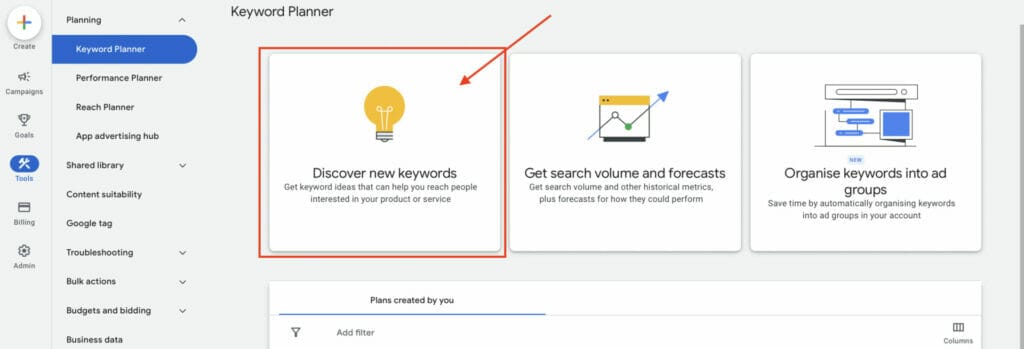
To use Keyword Planner from your Google Ads Dashboard:
- Click on “Tools” on the left side of your screen.
- Then select Planning, and click on Keyword Planner.
- Choose Discover new keywords.
Enter the products or services relevant to your funeral business, then click “Get results”.

You will now see all the relevant keywords that show up in relation to your keyword search. Any keywords already in your campaign will be labeled as “In Account” under the Account Status column. You will also see the keywords with the lowest bids and the highest bids.

To add any keywords from Keyword Planner, check the box of each keyword you want to add.
Then, click “More” at the top-right corner and select “Add to account”.

Make sure you add it to the right ad group campaign, then select your match type and click “Add“. In this case, we will add it to “Funeral Services Los Angeles”.

Your selected keywords should now be added to your Google Ads for funeral services campaign. Check under Account status that they are now labeled as “In Account”.

8.2 Negative keywords
A critical step you need to do when creating your Google Ads for funeral services is adding negative keywords.
Negative Keywords are the fourth keyword match type you can use in your campaign. These types of keywords ensure that your ad will not be triggered by certain keywords to show up on a user’s search engine results page. Negative keywords also ensure that your ad spending isn’t used on clicks that will not translate to leads and conversions, helping your Google ads for funeral services to focus on bringing your business more high-quality leads.
- Add negative keywords by first clicking on “Campaigns“
- Next, click on “Audiences, Keywords, and Content”
- Then, select “+Negative Keywords”
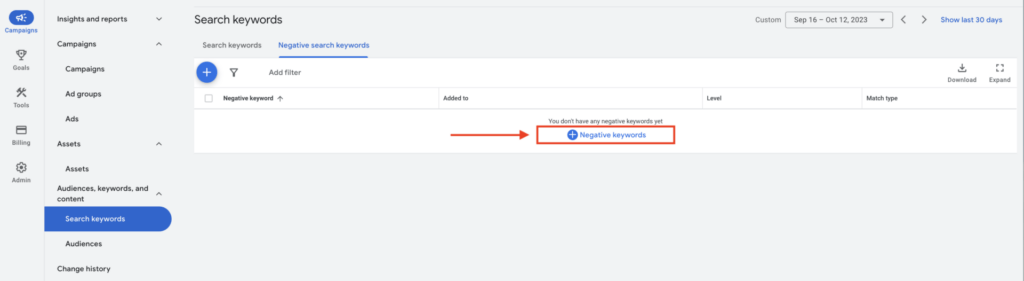
Enter all your negative keywords in the text box.
These keywords can be products or services your funeral business does not offer. If your funeral business does not offer services for pets, you can include it as negative keywords, for example, “cremation services for pets”. Similarly, you don’t want to show up for searches where a user is looking for funeral services in a different language, or for searches involving job openings or courses.
When you are with your negative keywords, click “Save“.

You should now see all your negative keywords added to your campaign.

Adding keywords to your campaign using the Keyword Planner is very easy. This is also applicable when using the Keyword Planner to add negative keywords.
Follow the exact same steps, and select the keywords you want as negative keywords. Then select “More“, and click “Add as negative keywords”.

Make sure you add these negative keywords to the right campaign, then click “Add“.

You should now have successfully added your negative keywords using the keyword planner.
To check if these were successful, the Account status for these negative keywords should be labeled in red as “In Plan: Negative”.

Need assistance with which negative keywords to use for your campaign?
8.3 Landing Pages
The Landing page of your funeral business should be a standalone page with the main purpose of converting leads into customers. This is also the page that users will usually be redirected to when they click on your ad.
An effective landing page will contain key elements that will encourage the user or website visitor to take a conversion action, and this means that your landing page should predominantly have CTAs or plenty of points of interaction that encourage conversion.
First and foremost, a landing page should have a clear Headline of what it is about, supported by a high-quality image or Hero Shot to visually communicate the offer. An effective landing page will also provide the user or website visitor with its unique selling proposition, or USP, that makes it stand out from local competitors, along with Key Benefits that should offer the solution to the problems or fears of your potential customers.
It is also important to include social proof or testimonials from previous customers who received your services, and these can be in written form, video format, or image feedback. The most critical elements to include in your landing page are CTAs, or Call-To-Action buttons. These should stand out from the page and be prominently placed throughout the landing page to offer the user or website visitor plenty of opportunities to convert. Another point of interaction or conversion that you can consider including in your landing page is a lead form, which should be in response to the product or service of your funeral business.
You can also add a “Frequently Asked Questions” section to provide additional information for the website visitor and further support your landing page efforts.
Do you need help optimizing your landing pages?
Let’s look at a landing page example that uses a variety of these key elements:


We recommend having a different landing page per product or service so that the user or website visitor isn’t distracted by other navigational links. Having different landing pages with different offers will also make customer segmentation easier, and it will allow you to further understand which offers work and which don’t.
9. Set Up Conversion Tracking & Call Tracking
A mistake that can quietly kill your Google Ads for cremation and funeral services is running ads without conversion tracking. If you don’t essentially tell Google what a successful lead or “win” looks like, it won’t be able to optimize towards it, and you won’t know which ads and keywords are actually generating business.
Because most funeral leads come by phone rather than form submissions, untracked calls will make your campaigns look completely non-responsive, even when your phones are ringing off the hook.
Before scaling your Google Ads budget, ensure these core elements are configured:
-
Call Tracking: Set a minimum call duration (such as 60 seconds) so only genuine inquiries are counted, filtering out spam or misdials.
-
Form & Click-to-Call Tracking: Track all form submissions and taps on click-to-call buttons as conversions.
-
Google Analytics 4 Integration: Link your GA4 account to Google Ads to map the entire customer journey from initial click to final lead.
-
Conversion Verification: Audit your setup to confirm calls and forms are actively firing before increasing your ad spend.
With tracking verified, Google’s automated bidding can optimize for high-value leads rather than empty clicks, giving you full visibility into top-performing keywords and a clearer return on ad spend.
Need help setting up conversion and call tracking?
10. Why Your Funeral Google Ads Aren’t Converting and How To Fix It
If your Google Ads are active but no leads are coming through, the issue could be one of these:
-
No call tracking – This is one of the most common causes. People might be calling you directly from the ad, but Google Ads still shows zero conversions. To fix this, you will need tos et up call conversions with a forwarding number.
-
Sending traffic to your homepage – If you send your leads to your homepage, that means too many links and distractions. To fix this, send each campaign to a designated landing page optimized to convert for a specific service.
-
Broad keywords without negative keywords – Without a strict negative keyword list, you will end up paying for useless clicks from researchers, students, and job seekers. To fix this issue, you should review irrelevant queries and add them as negatives on a weekly basis.
-
A budget that’s too low – If your average cost-per-click is $8 and your daily budget is only $10, you will only get one click a day. This won’t be enough data to generate leads. To fix this, set a realistic daily budget that will buy enough daily clicks to give your campaign momentum.
-
Generic, lifeless ad copy – If your ad copy sounds cold, corporate-sounding, and stiff, you are missing clicks on emotional searches. Write with warmth and clarity, highlight your specific location, and state what makes your services different to fix this.
11. Key Takeaways
If you’re looking for the fastest yet most reliable online advertising tool to bring you more new customers for your funeral business, then Google Ads is the marketing tool you need. This is because Google Ads can guarantee you high-quality leads in comparison to other online advertising tools, which in turn can help maximize your ROI, or return on investment. Additionally, Google Ads is the most popular PPC marketing platform because of its powerful targeting capabilities and because you can also track your results, which will help you further optimize your campaign and grow your business.
At YoYoFuMedia, we have been able to successfully help thousands of our clients achieve their target goals and grow their business with Google Ads, which you can read on YoYoFuMedia’s Page. If you want to get started with Google Ads but just don’t have the time to manage and optimize your campaign, we can help! Book Your Free Strategy Session and let us help you and your business.

